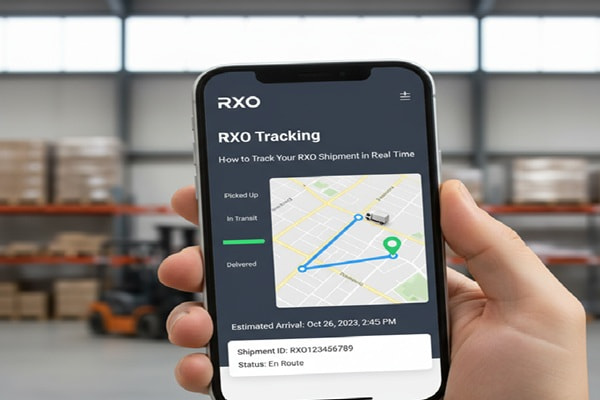
You ordered a refrigerator, a couch, or a treadmill. A few days later you get a shipping notification mentioning RXO. Now you want to know exactly where that item is and when it will show up at your door.
Track Your Order
That is a totally reasonable thing to want. RXO is not a typical parcel carrier like UPS or FedEx. They move big, heavy goods and coordinate home delivery appointments. The tracking process works a little differently, and most guides online do not explain it well.
This guide covers everything you need to know. Where to find your tracking number, how to check your delivery status, what each tracking status actually means, and what to do if things go sideways.
What Is RXO? (And Why Your Retailer Uses Them)
RXO is a logistics company headquartered in Charlotte, North Carolina. It was spun off from XPO Logistics in 2022 and now operates as an independent, publicly traded company on the New York Stock Exchange.
The company focuses on what the industry calls asset-light transportation. Rather than owning a fleet of trucks, RXO connects shippers with a network of over 100,000 independent carriers across North America. They act as the organizer, the technology layer, and the accountability layer between the retailer and the carrier doing the actual delivery.
What RXO Actually Delivers
If your package arrived through RXO, it is almost certainly a large, heavy item. RXO specializes in:
- Furniture, mattresses, and large home goods
- Appliances like refrigerators, washers, and dryers
- Exercise equipment and sporting goods
- Electronics requiring installation
- Big-box retail freight and store replenishment
Retailers use RXO because standard couriers are not equipped to carry a 300-pound refrigerator up two flights of stairs, connect it to the water line, and haul away the old one. RXO coordinates that kind of delivery at scale. According to company data, they arrange roughly 10 million last-mile deliveries per year.
RXO Service Types You Might Encounter
| Service Type | What It Means | Typical Use Case |
| Threshold Delivery | Item left at front door or garage | Lightweight furniture, boxes |
| Room of Choice | Driver carries item to any room | Sofas, chairs, large boxes |
| White Glove | Delivery plus assembly or installation | Appliances, exercise equipment |
| Assembly Only | Full product assembly on site | Furniture, trampolines |
| Debris Removal | Packaging removed after delivery | Any white glove delivery |
| Truckload Brokerage | Full truck freight for businesses | B2B commercial shipping |
| LTL Freight | Partial truck for smaller business loads | Smaller commercial orders |
How to Track Your RXO Shipment: All Methods
Method 1: Official RXO Tracking Portal (Recommended)
This is the most direct and reliable option for home delivery shipments.
- Open a browser and go to rxo.com/track
- Enter your RXO tracking number in the search field. You can also use your retailer order number if you do not have a tracking number yet.
- Click the Track button.
- Your current delivery status, estimated delivery window, and shipment history will appear on screen.
If you have a scheduled home delivery, you may also receive a text message or email with a tracking link directly from RXO. That link takes you to the same portal with your shipment pre-loaded.
Method 2: RXO Connect Portal (For Freight and Business Shippers)
Business customers and shippers managing freight use the RXO Connect platform at track.rxo.com. This portal provides deeper visibility including:
- Real-time shipment location on a map
- Estimated arrival times with weather alerts factored in
- Item-level traceability from pickup to delivery
- Automated notifications for delivery milestones
- Access to shipment documents and proof of delivery
Individual consumers receiving a home delivery generally do not need RXO Connect. The main tracking page at rxo.com/track is designed for you.
Method 3: Third-Party Tracking Platforms
If you prefer an all-in-one tracking dashboard that handles packages from multiple carriers, RXO is supported on several platforms:
- 17TRACK (17track.net) – Supports bulk tracking for multiple packages at once
- AfterShip (aftership.com) – Popular with Shopify and e-commerce sellers
- Parcel Monitor (parcelmonitor.com) – Offers email alerts and Gmail integration
- Parcels App (parcelsapp.com) – Works with retailer order numbers too
These tools are convenient if you are tracking multiple shipments from different carriers. They pull data from RXO’s tracking system and display it in their own interface.
Method 4: Contact RXO Directly
If online tracking is not giving you the information you need, you can reach RXO customer support directly:
| Phone (Last Mile / Home Delivery) | (800) 883-4593 |
| Email (Last Mile Orders) | lastmileorders@rxo.com |
| General Support / Freight Inquiries | Visit rxo.com and use the contact form |
Phone support is best for urgent issues like a missed delivery window or a scheduling change. Email works better when you need documentation or have a non-urgent inquiry.
Where to Find Your RXO Tracking Number
This is where most people get stuck. RXO tracking numbers do not always arrive in the same place, and they look different depending on the type of shipment.
For Home Delivery Orders (Most Common)
- Check your order confirmation email from the retailer
- Log in to your retailer account and visit your order history
- Look for a shipping confirmation email that arrived after you placed your order
- Check your spam or junk folder if you have not received anything
Your tracking number may start with RXO followed by a mix of letters and numbers, for example: RXONC70OB20DXZ4C25. However, formats vary. Some tracking numbers for RXO shipments look like standard alphanumeric codes without the RXO prefix.
For Freight and Business Shipments
- Check your bill of lading or freight invoice
- Look for a PRO number, shipment ID, or load number
- Log in to your RXO Connect account if you have one
- Contact your account manager or the RXO shipper support team
If you placed an order through a major retailer and cannot find a tracking number, call the retailer first. They coordinate the handoff to RXO and can often provide status updates directly.
What Each RXO Tracking Status Means
RXO tracking updates can be confusing if you have never used the service before. Here is what the main status messages actually mean:
| Tracking Status | What It Means | What to Do |
| Order Received | RXO has the shipment data but has not picked it up yet | Wait 1-2 business days for update |
| In Transit | Your item is moving through RXO’s carrier network | No action needed |
| At Local Hub | Item has arrived at the RXO service center near you | Expect a scheduling call or text soon |
| Delivery Scheduled | A specific date and time window has been set | Confirm you will be home for the window |
| Out for Delivery | The driver is on the way to your address today | Stay reachable by phone |
| Delivered | Delivery was completed and confirmed | Inspect your item immediately |
| Delivery Attempted | Driver came but could not complete delivery | Contact RXO to reschedule |
| Exception/Delayed | A problem is affecting the delivery timeline | Check back in 24 hours or contact RXO |
| Returned to Hub | Item was sent back after failed delivery attempts | Contact RXO urgently to resolve |
RXO Tracking Not Updating? Here Is What to Do
It happens to almost everyone. You check the tracking page and see the same status it showed three days ago. Before you panic, understand that RXO tracking updates are not always instant.
Normal Reasons for Delayed Updates
- Your item just shipped and the tracking number has not activated yet. Allow up to 24 hours after the shipping confirmation.
- The shipment is in transit between hubs. Scan events only happen when your item arrives at or departs from a facility.
- Weekends and public holidays slow down scan events and system updates.
- Customs processing for international components can pause domestic tracking visibility.
- Peak shipping seasons like November and December create backlogs across the network.
Steps to Take If Tracking Is Genuinely Stuck
- Double-check your tracking number for typos. Copy it directly from the confirmation email rather than typing it manually.
- Try entering your retailer order number instead of the RXO number. Some shipments resolve better by retailer order ID.
- Wait 24 hours. Many tracking delays resolve on their own once the system updates.
- Try a third-party tracker like 17TRACK or AfterShip. Sometimes these platforms refresh more frequently than the main portal.
- Call RXO at (800) 883-4593 with your tracking number and order details ready.
- Contact the retailer. They have direct access to RXO’s shipper-side tracking, which shows more detail than the consumer portal.
How RXO Home Delivery Appointments Work
RXO’s home delivery process is more involved than a standard parcel drop-off. Understanding the steps helps you track your order with more confidence.
- Order placed with retailer. The retailer sends shipment data to RXO.
- Item dispatched from the warehouse or manufacturer and begins moving toward the local RXO service center.
- Item arrives at the local hub near your address. Tracking will show ‘At Local Hub’ or a similar status.
- RXO reaches out by phone, text, or email to schedule a delivery window. You typically get a two-hour window.
- On the day of delivery, you receive a notification when the driver is getting close. Some services provide a live driver location link.
- Driver arrives, completes the delivery, and records proof of delivery. Your tracking updates to Delivered.
The time between item arriving at the local hub and scheduling your delivery window is usually 1 to 3 business days. If you miss the scheduling contact, call RXO proactively to get on the calendar.
Also Read : Pilot Freight Tracking: How to Track Your Shipment, Understand Status Codes, and Prepare for Delivery (2026)
Practical Tips to Stay Ahead of Your Delivery
- Save the RXO customer service number (800) 883-4593 in your phone the moment you get the shipping notification. You may need it.
- Set up email or SMS alerts through the RXO portal or a third-party tracker so you do not have to check manually.
- Be reachable on the phone number you gave the retailer. RXO will call to schedule your delivery and missed calls delay the process.
- Clear a path on delivery day. RXO’s last-mile teams handle heavy goods and need clear access from your entrance to the placement area.
- Inspect the item before signing anything. Note any visible damage on the delivery receipt. This protects you in case of a warranty or return claim.
- If you need to reschedule, do it as early as possible. Last-minute reschedules can push your delivery out by several days depending on route availability.
Mistakes That Slow Down Your RXO Delivery
- Waiting for RXO to call instead of calling them. If your item has been at the local hub for more than 3 days and you have heard nothing, reach out.
- Using the wrong tracking number. Freight shipments use PRO numbers, not the same format as home delivery tracking numbers. Entering the wrong format returns no results.
- Not being available during the delivery window. A missed delivery attempt can add 3 to 7 days to your wait time while rescheduling is worked out.
- Ignoring the damage inspection. Signing off without checking the item means you may have a harder time filing a claim if damage is discovered later.
- Contacting only the retailer for updates. The retailer often has limited visibility into real-time delivery status. Call RXO directly for accurate information.
Frequently Asked Questions
How long does RXO delivery take?
For home delivery of large items, RXO typically contacts you to schedule delivery within 1 to 3 business days of your item arriving at the local hub. Total transit time from the warehouse to your home varies by distance and service type but generally falls between 5 and 14 business days. Express options are available for urgent freight.
Can I track an RXO shipment without a tracking number?
Yes. The RXO tracking portal at rxo.com/track accepts retailer order numbers as an alternative to the RXO tracking number. If neither works, contact RXO directly with your name, delivery address, and the retailer’s order confirmation number.
Why does my RXO tracking say ‘At Local Hub’ for several days?
This is normal. Once your item arrives at the local service center, RXO coordinates a delivery appointment with you. The scheduling process typically takes 1 to 3 business days. If you have been waiting longer and have not received a call, contact RXO to initiate scheduling.
Can I change my RXO delivery appointment?
Yes. Contact RXO customer service at (800) 883-4593 to reschedule. It is best to do this at least 48 hours before your scheduled window to avoid delays in getting a new slot.
What is RXO Connect?
RXO Connect is RXO’s proprietary technology platform designed for business shippers. It provides real-time shipment visibility, ETA predictions, weather alerts, automated notifications, and item-level traceability. Business customers use it to manage freight and last-mile logistics at scale. Individual consumers do not need to use RXO Connect.
Why is my RXO tracking number not working?
The most common reasons are a typo in the tracking number, the number has not yet been activated in the system (allow up to 24 hours after shipping confirmation), or you are using a freight PRO number on the consumer portal. Copy the number directly from your email, double-check the format, and try again after a few hours.
Does RXO deliver on weekends?
RXO’s customer service operates seven days a week. Delivery availability on weekends depends on the local carrier network and your delivery location. Some markets offer Saturday delivery, particularly in urban areas. Ask RXO when scheduling your delivery window.
What happens if RXO delivers while I am not home?
For large items requiring a scheduled appointment, RXO will not leave the item unattended. They will record a failed delivery attempt and contact you to reschedule. Multiple failed attempts may result in the item being returned to the hub. Fees may apply for additional delivery attempts depending on the retailer’s arrangement with RXO.
Is RXO the same as XPO Logistics?
No, but they are related. RXO was originally the North American transportation division of XPO Logistics. In 2022, XPO spun off this division as a separate, independently traded public company under the ticker RXO on the New York Stock Exchange. The two companies now operate independently.
Can I track RXO international shipments?
RXO primarily serves North America but does offer freight forwarding services for ocean and air transportation with customs brokerage support. International tracking is available through the RXO Connect portal for business customers and through third-party platforms like 17TRACK for end consumers.