You ordered something from Ukraine, or maybe you sent a parcel abroad through Ukrposhta. You have a reference number. You check it. Nothing shows up. Or the status has not changed in four days and you have no idea if your package is sitting in a warehouse or already on a plane.
Track Your Order
That confusion is common, and it is usually not a sign that your parcel is lost. Ukrposhta, Ukraine’s national postal operator, has specific tracking rules, status labels, and timelines that are different from what most people expect. Once you understand how the system works, tracking becomes predictable.
This guide covers everything: how to find your tracking number, where to check it, what each status means, how long deliveries actually take, and what to do when something goes wrong.
Understanding Your Ukrposhta Tracking Number
Before you can track anything, you need to know what a valid tracking number looks like. Ukrposhta uses the international UPU (Universal Postal Union) format for all trackable international shipments.
The Standard Format
| Tracking Number Format
A Ukrposhta international tracking number always has 13 characters. It begins with two letters, followed by eight digits, one check digit, and ends in UA (the country code for Ukraine). Example: RA123456785UA |
The first two letters tell you exactly what kind of shipment you are dealing with:
| Prefix | Shipment Type | Max Weight |
| R… | Registered small packet | 2 kg |
| C… | Standard parcel | 20 kg |
| E… | EMS express delivery | 30 kg |
| V… | Insured letter | 5 kg |
| CP… | Priority parcel | 30 kg |
If your tracking number ends in something other than UA, the parcel originated in another country and is arriving into Ukraine. In that case, you can still track it on the Ukrposhta site, but the full journey will be visible on the sending country’s postal website too.
Where to Find Your Tracking Number
- On the paper receipt from the Ukrposhta post office counter
- In the shipping confirmation email from the seller or sender
- In the Ukrposhta personal account if the shipment was created online
- In an SMS notification sent by the post office at dispatch
- On the physical label stuck to your parcel
If the sender did not register the shipment (this can happen with standard unregistered letters), there will be no tracking number at all. Only registered shipments have tracking.
How to Track a Ukrposhta Package: 4 Methods That Work
You have several options for checking your parcel status. Each has its own strengths depending on whether you are inside Ukraine, abroad, or want automatic notifications.
Method 1: Official Ukrposhta Website (Most Reliable)
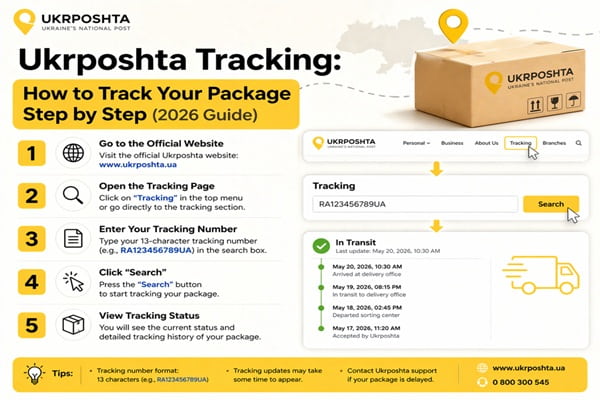
- Open a browser and go to track.ukrposhta.ua
- Type your 13-character tracking number in the search box
- Press the Track button
- View the full status history with dates, times, and locations
The official tracker supports up to 30 tracking numbers at once. Separate each number with a space or press Tab between entries. This is useful if you are managing multiple shipments.
Method 2: Ukrposhta Mobile App
Ukrposhta has an official app for both iOS and Android called Ukrposhta 2.0. After installing and logging in, you can add tracking numbers to a dashboard and receive push notifications when the status changes. The app also shows nearby post office locations and hours, which is useful when your parcel arrives and needs pickup.
Note: Some user reviews report the app can be slow on older devices. If you experience issues, the website version works just as well.
Method 3: Telegram or Facebook Chatbot
Ukrposhta offers a chatbot on both Telegram and Facebook Messenger. Search for the official Ukrposhta bot, start a conversation, and type your tracking number. The bot replies with the current status instantly. This is a convenient option if you are already using either platform.
Method 4: Third-Party Tracking Sites
If the official Ukrposhta site is unavailable or you want to track shipments from multiple carriers in one place, several reliable third-party platforms support Ukrposhta:
| Platform | Best For |
| 17track.net | Tracking across 1,700+ carriers, including Ukrposhta |
| parcelsapp.com | Mobile-first tracking with push notifications |
| aftership.com | E-commerce sellers managing many orders |
| postal.ninja | Detailed transit breakdowns for international routes |
| ship24.com | Multi-carrier tracking with estimated delivery dates |
These platforms pull data from the same Ukrposhta system, so results are usually identical to the official tracker. They can be especially useful when a parcel transitions from Ukrposhta to a local carrier in your country, since they show both legs of the journey in one timeline.
What Every Ukrposhta Tracking Status Actually Means
The status labels in Ukrposhta tracking can be cryptic, especially when viewed in translation. Here is a plain-language explanation of each one so you know exactly where your parcel is in the process.
| Tracking Status | What It Means |
| Accepted / Item accepted | The post office has received your parcel and logged it in the system. This is the first scan. |
| Sorted / In sorting center | The parcel is at a regional distribution hub being sorted by destination. |
| In transit | Your parcel is physically moving between post offices or sorting facilities. |
| Departed from exchange office | The parcel has left Ukraine’s international mail exchange point. It is on its way to the destination country. |
| Arrived at exchange office | The parcel has reached the international mail exchange in the destination country. Customs processing begins. |
| Customs clearance | Your parcel is being inspected by customs. This step can add several days, especially for commercial goods. |
| Handed to recipient / Delivered | The parcel has been delivered to the address or collected by the recipient. |
| Arrived at post office / Arrived at branch | The parcel is at a local post office waiting for pickup. Bring ID and your tracking number. |
| Held at post office | The parcel is being held, often because delivery was attempted and no one was home, or because a customs fee needs paying. |
| Return to sender | The parcel could not be delivered and is being sent back to the original sender. |
| Unsuccessful delivery attempt | The postman tried to deliver but no one answered. Check your post office for a pickup notice. |
One status that confuses many people is when the tracking shows delivered but the recipient has not received anything. This usually means the parcel was left with a neighbor, placed in a communal mailroom, or is waiting at the local branch. Check with your building staff before assuming it is lost.
Ukrposhta Delivery Times: Country-by-Country Estimates
Delivery times vary depending on destination, service type, and current postal volumes. The following estimates are based on standard air mail. Wartime conditions, customs backlogs, and peak seasons can extend these windows.
| Destination | Estimated Air Delivery | Notes |
| Within Ukraine (domestic) | 3 to 7 business days | Express: 1 to 3 days |
| Europe (EU countries) | 7 to 14 business days | Faster for Germany, Poland, Czech Republic |
| United States | 7 to 12 business days (air) | Sea freight: 25 to 35 days |
| Canada | 10 to 20 business days | Customs can add 5 to 10 days |
| United Kingdom | 7 to 14 business days | Post-Brexit customs checks apply |
| Australia | 15 to 25 business days | Sea route: up to 45 days |
| China | 10 to 20 business days | Tracked via dedicated China tracking portal |
| Middle East | 10 to 18 business days | Varies significantly by country |
EMS (Express Mail Service) shipments are faster, typically cutting the above estimates roughly in half. EMS is the right choice when delivery speed matters more than cost.
Business days exclude Ukrainian national holidays and any non-working days at the destination country’s postal service.
Solving Common Ukrposhta Tracking Problems
Problem: Tracking Shows No Information
This almost always happens in the first 24 hours after dispatch. The post office accepts the parcel and prints a receipt, but the scan data takes time to enter the central system. Wait at least one full business day before assuming something is wrong.
If there is still no information after 48 hours, double-check that you have the correct tracking number. A single wrong character makes the whole search fail.
Problem: Status Has Not Updated in Several Days
Tracking updates only trigger when a parcel is physically scanned at a checkpoint. Between checkpoints, no new status appears even though the parcel is moving. This is normal during the transit phase, especially for international shipments crossing borders.
If the status has been stuck on the same step for more than five business days, that is worth investigating. Contact the Ukrposhta support line at 0 800 300 545 (free within Ukraine) or email ukrposhta@ukrposhta.ua.
Problem: Parcel Stuck at Customs
Customs holds are one of the most common reasons for delays, especially for shipments going to the EU, US, UK, Canada, or Australia. The hold can last anywhere from one day to several weeks depending on the declared value, the type of goods, and whether any documentation is missing.
If your parcel is at customs and you receive a notification requesting payment of import duties, pay promptly to release the shipment. Delays in payment often result in additional storage fees or return to sender.
Problem: Status Shows Delivered But Parcel Not Received
- Check with neighbors or building reception
- Look for a pickup notice left by the postman
- Visit your local post office with ID and the tracking number
- Check if a household member signed for it without telling you
- If none of the above, file a claim on the Ukrposhta website within 30 days
Problem: Parcel Is Being Returned to Sender
Returns happen when the recipient could not be reached, the address was wrong, customs fees were unpaid, or the parcel was refused. If you are the sender, contact the recipient immediately. If you are the recipient and the return was a mistake, contact Ukrposhta support to try to intercept the parcel before it crosses the border back.
Also Read : Mainfreight Tracking: How to Track Your Shipment
Expert Tips for Smoother Ukrposhta Tracking
- Use the official tracker first. Third-party sites are useful, but the official track.ukrposhta.ua site is updated directly and has the most complete history.
- Save your tracking number before leaving the post office. Receipts get lost. Take a photo of the number immediately.
- Enable notifications in the app or chatbot. This way you do not need to manually check. You get an alert the moment your parcel moves.
- Track on both sides for international parcels. Once your parcel crosses the border, check the destination country’s postal site too. Many carriers pick up tracking from the local leg of the journey.
- Pick up promptly when it arrives at the branch. Ukrposhta holds parcels for 7 calendar days. After that, they are returned to the sender.
- For EMS shipments, cross-check on the UPU site. The Universal Postal Union tracker at tracking.upu.int works for all UPU member countries and often shows more detailed intermediate statuses.
Ukrposhta Contact Information and Support
| Contact Method | Details |
| Toll-free phone (Ukraine) | 0 800 300 545 |
| ukrposhta@ukrposhta.ua | |
| Head office address | 22 Khreshchatyk Street, Kyiv, 01001, Ukraine |
| Official tracking page | track.ukrposhta.ua |
| Online claim submission | Available in your Ukrposhta personal account |
| Telegram bot | Search @ukrposhta_bot on Telegram |
For international claims where a parcel appears lost, the sender must file the claim, not the recipient. The sender submits an online claim via the Ukrposhta personal account, attaches a photo of the receipt and packaging, and describes the situation. Resolution times vary but typically take two to four weeks for international cases.
Frequently Asked Questions
Can I track a Ukrposhta parcel without a tracking number?
No. Tracking requires a unique postal identifier. Without the tracking number, the only option is to visit a Ukrposhta branch in person with a valid ID. Online tracking by name, phone number, or address is not supported due to personal data protection rules.
How many parcels can I track at once on the Ukrposhta website?
The official tracking page supports up to 30 shipments at one time. Enter each tracking number separated by a space or press Tab between entries. Results appear for all numbers simultaneously.
Can I track a parcel sent to Ukraine from another country?
Yes. The Ukrposhta tracking system works for both inbound and outbound international shipments. For a parcel coming into Ukraine, you can check it on the Ukrposhta site once it crosses into the Ukrainian postal network. Before that, use the sending country’s postal tracker.
Why does my tracking number not work on the Ukrposhta site?
The most common reasons are: the number was entered with errors (check for zero vs letter O or the number 1 vs letter I), the parcel was sent without registration so it has no tracking, or the shipment is less than 24 hours old and has not yet appeared in the system.
Is Ukrposhta tracking affected by the ongoing situation in Ukraine?
Yes, to some extent. Ukrposhta has continued operating throughout the conflict but some routes and regions experience delays. Processing times at certain facilities can be slower, and some international airlines have suspended flights to Ukraine, which can affect air mail timelines. Always add a buffer to estimated delivery times for shipments involving Ukraine.
How long does Ukrposhta hold a parcel at the post office?
The standard storage period is 7 calendar days from the date the parcel arrives at your local branch. After this period, the parcel is typically returned to the sender. Collect your parcel as soon as you receive a pickup notification to avoid a return.
Can I redirect a Ukrposhta parcel to a different address?
Yes. If the parcel was sent from Ukraine using an online Ukrposhta account, the sender can request a change of address by completing an online form on the Ukrposhta website. This must be done before the parcel reaches the destination post office.
What is the difference between Ukrposhta standard and EMS delivery?
Standard delivery is slower and cheaper, suitable for non-urgent parcels. EMS (Express Mail Service) is a premium international service with faster transit times, end-to-end tracking, and delivery priority at border crossings and customs. EMS is the right choice when speed matters more than cost.
Are there items that Ukrposhta will not ship internationally?
Yes. Ukrposhta follows Universal Postal Union restrictions and has its own prohibited items list. Generally banned items include dangerous goods, currency, live animals, perishables, and items restricted by the destination country’s customs rules. Check the Ukrposhta website for the current list before shipping.