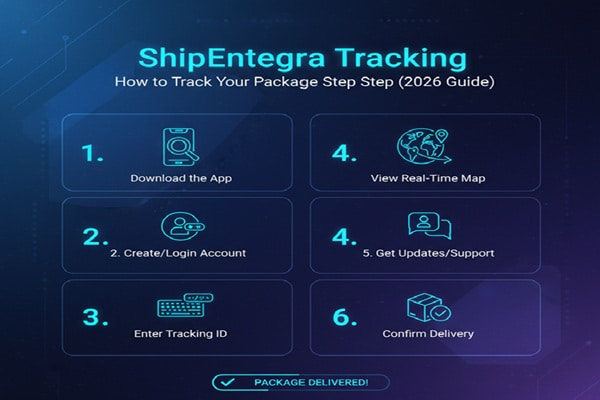
You ordered something from a Turkish seller on Amazon, Etsy, or eBay. A few days later you get a confirmation with a string of letters and numbers you have never seen before. Not a DHL number. Not a FedEx number. Something that starts with two letters and ends with a mix of digits. That is a ShipEntegra tracking number, and it works a little differently from what most buyers expect.
Track Your Order
This guide explains exactly what ShipEntegra is, how its tracking system works, what every status message means, and what to do when something goes wrong. Whether you are a buyer waiting for a parcel or a seller managing hundreds of orders, everything you need is on this page.
What Is ShipEntegra?
ShipEntegra is a Turkish technology company that combines e-commerce logistics with order management software. Founded under the vision of making e-export straightforward for small and medium-sized businesses in Turkey, the platform connects sellers to global marketplaces and international carriers through a single dashboard.
The company was recognised by Deloitte Technology Fast 50 Turkey in 2022, winning first place with a growth rate of 8,545 percent. It is the official service provider for Amazon SPN, has a formal partnership with eBay, and holds Walmart Marketplace’s exclusive shipping and fulfillment provider status in Turkey. It also became the first Turkish technology company recognised by Etsy.
ShipEntegra operates eight centers across Turkey and the United States, covering cities including Istanbul, Ankara, Izmir, Kayseri, Antalya, and Bursa. For buyers, it is most commonly encountered when receiving a package from a Turkish seller on one of the major global marketplaces.
How ShipEntegra Fits Into Your Delivery
ShipEntegra is not a final-mile carrier. It is an integration and logistics management platform. When a seller ships through ShipEntegra, the package travels via an underlying carrier such as UPS, FedEx, DHL, or TNT. ShipEntegra generates the tracking number, manages customs documentation, and pushes status updates. The physical delivery is completed by the partner carrier in your country.
Understanding Your ShipEntegra Tracking Number
ShipEntegra tracking numbers follow a consistent format that makes them easy to identify once you know what to look for.
| Detail | Information |
| Format | 10 alphanumeric characters (letters and numbers combined) |
| Example | AB1234C5D6 |
| Where to find it | On the ShipEntegra label below the logo, at the end of the label next to the barcode, in your order or shipment page inside the ShipEntegra panel, or in the confirmation email from your seller |
| Multiple parcels | You can track several numbers at once by separating them with a comma or a space on the tracking page |
| Activation time | Allow 24 to 48 hours after handover before the tracking number becomes active in the system |
If the tracking number you received looks different from the 10-character format above, check whether the seller has provided a carrier-level tracking number (such as a UPS or DHL reference) rather than the ShipEntegra reference. Both can be used, but on different platforms.
How to Track a ShipEntegra Package: 4 Methods
Method 1: Official ShipEntegra Tracking Portal
This is the most direct and reliable option for buyers.
- Open your browser and navigate to track.shipentegra.com
- In the tracking field, enter your 10-character ShipEntegra tracking number
- To track multiple shipments at once, separate each number with a comma or a space
- Click the track button
- The page shows your current shipment status, location history, and delivery updates
Method 2: ShipEntegra Mobile App
The ShipEntegra app is available on both iOS (App Store) and Android (Google Play). It is primarily designed for sellers, but buyers who have received a tracking number can use the app’s tracking feature without a full seller account. The app supports push notifications for shipment acceptance, delivery, and status changes.
Sellers using the app get an additional feature called Starred Orders, which lets them flag and monitor priority shipments separately from the main order list.
Method 3: Third-Party Tracking Platforms
Several third-party tracking aggregators support ShipEntegra shipments. These are useful when you want to monitor a ShipEntegra package alongside shipments from other carriers in one place, or when your tracking page is not loading.
- AfterShip (aftership.com) supports ShipEntegra and shows normalised status updates
- 17TRACK (17track.net) supports ShipEntegra tracking numbers
- ParcelsApp (parcelsapp.com) can often detect the last-mile carrier and switch tracking automatically as the parcel moves to your country
- 51Tracking (51tracking.com) supports auto-import from Shopify, Amazon, WooCommerce, and eBay
A practical tip: if you are a buyer in the United States or Europe and your parcel has transferred to a local carrier, ParcelsApp and AfterShip are your best options because they attempt to identify and switch to the last-mile carrier automatically.
Method 4: Via Your Marketplace Order Page
If you ordered through Amazon, eBay, Etsy, Shopify, or Walmart, the seller’s ShipEntegra account automatically pushes tracking numbers back to those platforms. Check your order detail page on the marketplace for a tracking link. Clicking it usually redirects you to the ShipEntegra tracking portal with the number pre-filled.
ShipEntegra Tracking Status Meanings: Plain Language Guide
Status messages update each time the package reaches a new checkpoint. Here is what each one means and whether you need to take any action.
| Status | What It Means | Action Required? |
| Order Created / Label Generated | The shipping label has been created but the parcel has not been physically handed to a carrier yet. Tracking will not show movement until pickup occurs. | No. Wait for the seller to hand over. |
| Shipment Accepted | The parcel has been received at a ShipEntegra facility or handed to the partner carrier. Tracking is now active. | No. Normal first event. |
| In Transit | The package is moving between facilities. Scans happen at each checkpoint, not continuously. | No. Normal movement. |
| Arrived at Sorting Center | Package is at a logistics hub being consolidated or redirected. | No. Normal for international routing. |
| Customs Clearance | The parcel has reached the destination country and is being processed by customs authorities. This is normal for all international shipments. | Possible. Buyer may need to pay import duty. |
| Out for Delivery | The local delivery agent has the package on a vehicle and is delivering it today. | Be available to receive. |
| Delivered | Delivery has been confirmed. A signature or photo may have been captured. | Confirm receipt. |
| Delivery Attempted | Delivery was tried but failed, usually because no one was home or access was restricted. | Arrange redelivery or collection. |
| On Hold / Pending | Shipment is paused due to customs, documentation, address, or carrier issue. | Contact ShipEntegra support. |
| Returned to Sender | Delivery failed completely and the parcel is being sent back to the origin. | Contact seller immediately. |
ShipEntegra Delivery Times by Destination
Because ShipEntegra relies on partner carriers for final delivery, transit times vary depending on which carrier is used for your lane and the service level the seller selected.
| Destination Region | Standard Delivery | Express Delivery |
| United Kingdom | 5 to 10 business days | 3 to 5 business days |
| European Union | 5 to 12 business days | 3 to 7 business days |
| United States | 7 to 14 business days | 5 to 10 business days |
| Canada | 8 to 15 business days | 5 to 10 business days |
| Australia | 10 to 18 business days | 7 to 12 business days |
| Middle East | 5 to 10 business days | 3 to 7 business days |
| Rest of World | 10 to 25 business days | Varies by country |
These are estimates. Customs processing, public holidays, peak shopping periods, and carrier capacity can all extend these windows. The tracking page shows an estimated delivery date specific to your shipment once the parcel has been scanned into the network.
Common ShipEntegra Tracking Problems and How to Fix Them
Problem: Tracking Number Not Found
The most common cause is that the parcel has not yet been physically handed over at a ShipEntegra facility. The tracking number is generated when the label is created, which can happen a day or two before pickup. Allow 24 to 48 hours from the time the seller confirms dispatch before expecting tracking to activate.
If 48 hours have passed and tracking still shows nothing, double-check the number character by character. ShipEntegra tracking numbers are 10 characters and use a mix of uppercase letters and digits. A single transposed character makes the number unfindable.
Problem: Status Not Updating for Several Days
For international shipments, gaps of two to four days between scans are normal, especially during the ocean or long-haul air segment where the parcel is not near a scanning point. If your parcel is crossing into your country, customs processing can also pause visible updates for several days.
If there has been no update for more than seven business days with no customs-related status visible, contact ShipEntegra customer support at destek@shipentegra.com and include your tracking number and order details.
Problem: Package Shows Delivered But Not Received
First check whether the parcel was left with a neighbour, at a reception desk, in a safe location near your door, or held at a local post office or collection point. The final-mile carrier in your country may have delivery protocols you are not aware of.
If none of those apply, contact ShipEntegra with your tracking number and request a proof of delivery document. This shows the delivery date, time, and any signature or photo captured at the point of handover.
Problem: Parcel Stuck at Customs
Customs holds are a standard part of international shipping. Most low-value personal parcels clear automatically within a few business days. Higher-value items, commercial goods, or shipments with incomplete documentation may require the buyer to provide information or pay import duties to the customs authority.
ShipEntegra prepares customs documentation automatically for sellers using its platform, which reduces clearance problems. But if your parcel is held, contact your national customs authority with the tracking number first. If the problem is documentation-related, contact ShipEntegra support so the seller can provide corrected paperwork.
Problem: Delivery Attempted But Failed
When a delivery attempt fails, the carrier in your country typically leaves a notification card or sends an SMS or email with redelivery instructions. Check your phone and email for messages from local carriers like Royal Mail, USPS, UPS, DHL, or a national postal operator depending on your country.
Most carriers allow you to reschedule delivery, redirect to a collection point, or arrange for a neighbour to receive the parcel through their tracking portals or customer service lines.
For Sellers: How ShipEntegra Tracking Works Inside the Platform
If you are a seller using ShipEntegra, tracking is managed inside your ShipEntegra panel and pushed automatically to your connected marketplaces. Here is how the seller-side tracking workflow operates:
- Connect your stores: Integrate your Amazon, eBay, Etsy, Shopify, WooCommerce, or other store accounts with your ShipEntegra account. Order details sync automatically, eliminating manual data entry.
- Create shipments in bulk: Select single or multiple orders and create shipments with one click. ShipEntegra calculates shipping options and prices from partner carriers including UPS, FedEx, DHL, and TNT.
- Label generation and customs docs: ShipEntegra generates the shipping label and all required customs documentation automatically, including ETGB (Electronic Trade Customs Declaration) for Turkish micro-export shipments.
- Tracking number pushed to marketplace: Once the shipment is created, the tracking number is sent to your marketplace within seconds. Buyers see tracking information without any manual upload on your part.
- Monitor from one dashboard: All active shipments across all stores appear in a single tracking panel. You can filter by status, flag priority orders with the Starred Orders feature, and view full movement history per shipment.
- Notifications: The platform sends automatic notifications to your customers at key tracking milestones including acceptance, in-transit updates, and delivery confirmation.
ShipEntegra Marketplace and Carrier Integrations
One of the main reasons sellers choose ShipEntegra is its breadth of integration. Here is the current scope:
| Marketplace Integrations | Carrier Integrations |
| Amazon, eBay, Etsy, Shopify | UPS, FedEx, DHL, TNT |
| Walmart, AliExpress, Wish | National postal networks |
| WooCommerce, PrestaShop, Magento | Regional express carriers by route |
| OpenCart, Bonanza, Wix | Carrier selected automatically by destination and price |
ShipEntegra’s system automatically selects the most cost-effective and fastest carrier for each destination based on the parcel’s weight, dimensions, declared value, and the seller’s account tier. This is why two ShipEntegra packages going to the same country might travel on different underlying carriers.
Also Read : C.H. Robinson Tracking: How to Track Your Freight Shipment (Complete Guide)
Expert Tips for ShipEntegra Tracking
- For buyers: save your tracking number as soon as you receive the confirmation email. Do not rely on the marketplace order page alone. If the marketplace removes old order details, you will lose access to the tracking number.
- For buyers receiving parcels in the US or Europe: Use ParcelsApp or AfterShip alongside the ShipEntegra portal. These platforms detect when the parcel has transferred to a local carrier and switch tracking automatically, giving you last-mile visibility that the ShipEntegra portal may not show.
- For sellers: enable early tracking numbers. ShipEntegra lets sellers generate and share tracking numbers before the parcel physically departs. This protects your marketplace seller metrics on platforms like Amazon and eBay where late tracking upload hurts your account standing.
- For sellers with high volume: Use the ShipEntegra API to integrate shipment and tracking data directly into your own system. The tracking API is supported by several third-party developers and aggregators.
- During peak seasons (November to January): Build an extra three to five business days into your delivery estimates. Carrier capacity globally is under pressure during this period, and customs processing times also lengthen significantly.
- If tracking stops updating at a sorting center: Check whether the status is ‘Arrived at Sorting Center’ or ‘Customs Clearance.’ These are holding points, not problems. Wait at least three business days before escalating.
ShipEntegra Tracking Checklist
Before contacting support, run through this list:
- Is your tracking number exactly 10 characters with no spaces, dashes, or extra digits?
- Has it been more than 48 hours since the seller confirmed dispatch?
- Have you tried both track.shipentegra.com and a third-party platform like AfterShip?
- If the status shows Customs Clearance, have you checked your email for a customs notification from your national postal authority?
- If the status shows Delivery Attempted, have you checked your phone and email for a redelivery notification from the local carrier?
- If the status shows Delivered, have you checked with neighbours, the building reception, and a nearby collection point?
- If there is no update for more than 7 business days, do you have your tracking number, order date, and seller information ready to provide to ShipEntegra support?
Mistakes People Make When Tracking ShipEntegra Shipments
- Checking tracking within hours of receiving the confirmation email. The tracking number is created at label generation, which can be a day or two before the parcel reaches a ShipEntegra facility.
- Using the wrong tracking portal. ShipEntegra’s number will not work on DHL, UPS, or FedEx portals directly unless you have the carrier-level number, which is a separate reference.
- Assuming no update means the parcel is lost. Gaps of several days are normal for international shipments, especially during the main transit phase between countries.
- Ignoring customs notifications. Many buyers discard emails from their national customs authority thinking they are spam. These emails may require action to release the parcel.
- Not following up after a failed delivery attempt. Most carriers return undelivered parcels to a depot and hold them for 5 to 15 days. After that, they are returned to the sender.
- For sellers: uploading tracking numbers manually to marketplaces after they are already in the ShipEntegra panel. This can cause duplicate or conflicting tracking information to appear on the marketplace order page.
ShipEntegra Contact Information
| Contact Method | Details |
| Support Email | destek@shipentegra.com |
| Tracking Portal | track.shipentegra.com |
| Main Website | shipentegra.com/en |
| Mobile App (iOS) | App Store – search ShipEntegra |
| Mobile App (Android) | Google Play – search ShipEntegra |
| Headquarters | Istanbul, Turkey (with US locations) |
| Support via app | Requests section covers tracking, store integration, payment, technical support, ETGB/Micro Export, and damage or loss claims |
Frequently Asked Questions
What does a ShipEntegra tracking number look like?
A ShipEntegra tracking number is 10 characters long, combining uppercase letters and digits. A typical example looks like AB1234C5D6. It appears on the shipping label below the ShipEntegra logo and at the end of the label next to the barcode.
How long does it take for ShipEntegra tracking to activate?
Tracking typically becomes active within 24 to 48 hours after the parcel has been physically accepted at a ShipEntegra facility. The tracking number is generated earlier, at label creation, but will show no movement until the first physical scan occurs.
Why is my ShipEntegra tracking not updating?
Gaps in tracking updates are normal for international shipments. During long transit phases, sorting center stays, or customs processing, the parcel may go without a visible scan for two to four business days. If there is no update for more than seven business days, contact ShipEntegra support at destek@shipentegra.com with your tracking number.
Can I track a ShipEntegra package from the USA?
Yes. Use track.shipentegra.com or a third-party aggregator like AfterShip or ParcelsApp. For US deliveries, the final-mile carrier is often USPS, UPS, or FedEx depending on the service selected by the seller. Third-party platforms can detect the handoff and continue tracking on the local carrier automatically.
What carriers does ShipEntegra use?
ShipEntegra partners with UPS, FedEx, DHL, and TNT as its primary express carrier network, plus national postal operators for certain destinations. The carrier for your specific shipment is selected automatically based on destination, weight, dimensions, and service level. You may find the specific carrier name on your ShipEntegra tracking page once the shipment is accepted.
What should I do if my ShipEntegra package is stuck at customs?
First check your email for any customs notification from your country’s postal or customs authority. Low-value personal items usually clear within a few business days without buyer action. For higher-value items, you may need to submit a declaration or pay import duty. If the customs hold has lasted more than 10 business days with no communication, contact ShipEntegra support with your tracking number.
Can sellers track all their ShipEntegra shipments in one place?
Yes. The ShipEntegra panel shows all active and historical shipments from all connected stores in a single dashboard. Sellers can filter by status, flag priority orders using Starred Orders, view full movement history per shipment, and track across 20-plus marketplace integrations from the same screen.
Is ShipEntegra tracking free?
Tracking via track.shipentegra.com is free for anyone with a valid tracking number. The ShipEntegra platform itself is a paid service for sellers, but carriers and buyers tracking individual packages do not pay to use the tracking tool.
What happens if my ShipEntegra package is not delivered?
If delivery fails, the carrier in your destination country will typically hold the parcel at a depot for 5 to 15 days before returning it to the sender. Check your phone and email for redelivery notifications. If the parcel is returned, contact the seller to arrange a replacement shipment or refund, as ShipEntegra’s compensation and damage claims process is handled through the support request section of the seller’s account.