
You shipped something important. Now it’s moving through the western United States on an Oak Harbor Freight Lines truck, and you want to know exactly where it is. That is a completely reasonable thing to want, and Oak Harbor makes it straightforward to find out.
Track Your Order
This guide walks you through every tracking method available, explains what each status message actually means, tells you what to do when tracking stops updating, and covers the common mistakes that leave people confused. Whether you are a first-time shipper or a business managing dozens of LTL pallets every month, the information here applies directly to your situation.
What Is Oak Harbor Freight Lines?
Oak Harbor Freight Lines (OHFL) is a family-owned Less-Than-Truckload (LTL) carrier based in Auburn, Washington. The company was founded in 1916 by Ben Koetje as a small cartage service on Whidbey Island. In 1936, brothers John and Gus Vander Pol bought the business for $600. Their family still runs it today, which is genuinely rare in American trucking.
Over more than a century, Oak Harbor has grown into a major regional carrier. Today it operates 41 terminals, over 850 tractors, and around 1,900 employees. Its headquarters remains in Auburn, Washington, at 1339 West Valley Highway North.
The carrier focuses on the western United States. It provides more direct delivery points in the Pacific Northwest than any other single LTL carrier. Through strategic partner networks, it also connects shipments to the rest of the country and Canada.
| Direct Service States | Extended Service (via Partners) |
| Arizona, California, Idaho, Nevada, Oregon, Utah, Washington | All remaining U.S. states and Canada (transborder service available) |
Understanding Oak Harbor Tracking Numbers
Before you can track anything, you need the right number. Oak Harbor uses a few different identifiers, and mixing them up is the most common reason tracking searches come back empty.
PRO Number (Primary Tracking ID)
This is the most important number for tracking purposes. It is a unique numerical code, typically 7 to 10 digits long, assigned specifically to your freight bill. Every Oak Harbor shipment gets one. If you have it, use it first. It pulls the most complete and accurate tracking data available.
Where to find it: your shipping confirmation email, the freight receipt from pickup, the Bill of Lading document, or the invoice from your shipper.
Bill of Lading (BOL) Number
The BOL is the legal shipping contract between the shipper and carrier. You can often use it to look up tracking if you do not have the PRO number yet, though results may be less detailed. It is also found on your shipping paperwork.
Pickup Number
Some tracking portals accept the pickup or booking reference number. This is assigned when the freight pickup is scheduled. It is useful if you need to check status before a PRO has been generated.
How to Track Your Oak Harbor Shipment: Step-by-Step
Method 1: Official Oak Harbor Website (Recommended)
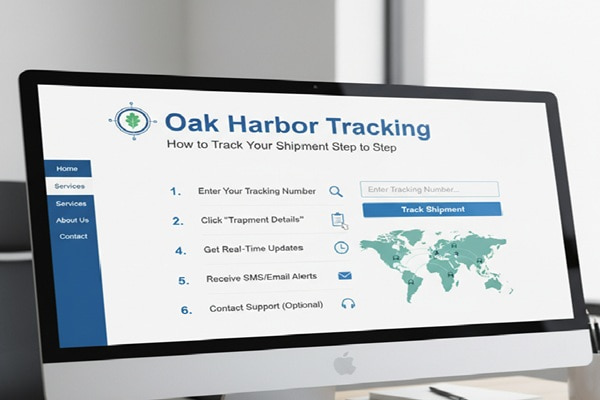
This is the most direct and reliable way to check your shipment status. Here is exactly how to do it:
- Open a browser and go to com
- Click on the “Trace” or “Track Your Shipment” section on the homepage
- Type in your PRO number, BOL number, or Pickup number in the search field
- Click the Track button
- Review your shipment’s current location, terminal stops, and estimated delivery date
Tracking data typically becomes available within a few hours of pickup. If you search immediately after booking and see nothing, wait a few hours and check again.
Method 2: Online Account Portal
If you ship with Oak Harbor regularly, creating an account on oakh.com gives you a dashboard where all past and active shipments are listed in one place. This is particularly useful for businesses managing multiple shipments at the same time. You can view full history, download shipping documents, and request pickups from the same screen.
Method 3: Customer Service
Sometimes you need a real person. Oak Harbor’s customer service team can look up any shipment and give you a status update, even for issues that online tracking does not reflect, such as an appointment that needs to be scheduled or a delivery exception.
| Oak Harbor Contact Information
Phone: (253) 288-8300 | Fax: 1 (253) 461-5444 Email: Available via the contact page at oakh.com Headquarters: 1339 West Valley Highway North, PO Box 1469, Auburn, WA 98071-1469 Hours: Business days (closed on major holidays including New Year’s Day, Memorial Day, July 4th, Labor Day, Thanksgiving, and Christmas) |
Method 4: Third-Party Tracking Platforms
Several third-party platforms support Oak Harbor tracking using your PRO or BOL number. These can be useful if you use multiple carriers and want one dashboard to check everything at once.
- 17TRACK (17track.net)
- AfterShip (aftership.com)
- Ship24 (ship24.com)
- GoComet (gocomet.com)
- FreightCenter (if shipment was booked through their platform)
Note that third-party platforms pull data from Oak Harbor’s own system. They do not have additional information the official site lacks. For the fastest and most up-to-date results, the official Oak Harbor website is still the best option.
What Each Tracking Status Means
Oak Harbor uses standard LTL freight status language. Here is what each message actually means so you are not left guessing.
| Status | What It Means |
| Picked Up | The freight has been collected from the shipper. It is at the origin terminal waiting for its linehaul truck. |
| In Transit | The freight is moving between terminals on a linehaul truck. This is the active movement phase. |
| At Terminal | The shipment has arrived at a terminal and is being sorted or held before moving to the next stop. |
| Out for Delivery | A local driver has loaded your freight and is making deliveries in your area. Expect arrival that day. |
| Appointment Required | Oak Harbor needs to contact the recipient to schedule a delivery time. Call customer service to speed this up. |
| Delivered | The freight has been signed for and the delivery is complete. |
| Exception | Something has come up: wrong address, damage noted, refused delivery, or a pickup issue. Contact customer service immediately. |
Oak Harbor Delivery Times: What to Expect
Transit times for LTL freight depend on origin, destination, and service type. Here are the general ranges you can expect with Oak Harbor.
Within the Western U.S. Direct Service Area
- Same-day or next-day delivery for nearby locations within the same state
- 1 to 3 business days for most shipments within the 7-state direct service area
- 2 to 4 business days for more remote points in Idaho, Nevada, or Arizona
Nationwide and Canada Service
- 3 to 5 business days for shipments to the rest of the U.S. through partner carriers
- 3 to 6 business days for Canada shipments, depending on origin state and destination city
For the most accurate estimate for your specific route, use the Service Time Calculator available on the Oak Harbor website. Enter your origin and destination zip codes and it will give you an expected transit time. Holiday closures can extend these times by one business day.
Oak Harbor Freight Lines Services at a Glance
Oak Harbor is not just an LTL carrier. Understanding the full range of services helps you choose the right option for each shipment and set accurate delivery expectations.
Less-Than-Truckload (LTL)
This is Oak Harbor’s core service. Your freight shares space in a truck with other shippers’ goods. It is ideal for pallets, crates, or any shipment that does not fill an entire truck. You only pay for the space your freight actually uses.
Guaranteed Delivery Service
For time-sensitive freight, Oak Harbor offers a guaranteed service option. If your shipment does not arrive within the committed transit window, Oak Harbor will not charge you for that shipment and no claims process is required. It is a straightforward commitment that few regional carriers offer.
Full Truckload (FTL)
When a shipment is large enough to fill a truck, full truckload service provides a dedicated truck for your freight alone. This is faster and more secure for large shipments.
Expedited and Time-Critical Shipping
For urgent shipments that cannot wait for standard LTL scheduling, Oak Harbor offers expedited options that prioritize your freight in the transit queue.
Canada Transborder Service
Oak Harbor handles customs coordination and carrier connections for shipments crossing the U.S.-Canada border. This simplifies a process that can otherwise involve multiple carriers and separate tracking systems.
When Oak Harbor Tracking Is Not Working: Common Problems and Fixes
Tracking issues are frustrating, but most of them have a simple explanation and an easy fix. Here are the situations that come up most often.
Tracking Shows No Results
The most likely cause is an incorrect PRO number. Even a single digit difference will return nothing. Double-check the number from your original documentation. If you only have a BOL number, try entering that instead. Tracking data typically takes 2 to 6 hours after pickup to appear in the system. If you booked recently and are checking immediately, wait a few hours and try again.
Status Stuck on ‘Picked Up’ for More Than 24 Hours
This usually means your freight is sitting at the origin terminal waiting for a linehaul truck with space available. It is not lost. It will move on the next scheduled departure for your route. If it has been more than 48 hours with no movement, contact customer service with your PRO number and they can give you the current terminal status.
Status Says ‘Appointment Required’
Oak Harbor needs to schedule a specific delivery window with the recipient. This often happens for deliveries to residential addresses, limited-access locations, or businesses with specific receiving hours. Call customer service to provide your availability or authorize the terminal to schedule directly with the consignee.
Tracking Shows Delivered But You Have Not Received Anything
First check whether a neighbor or another person at your address signed for it. Check around all entry points of the building. If you still cannot locate it, call Oak Harbor customer service immediately with the PRO number and the delivery date shown. They can pull the driver’s delivery confirmation including the signature name.
Tracking Not Updating for Several Days
If freight is stuck at a partner carrier terminal for a national or Canada shipment, updates can slow down because Oak Harbor is pulling data from another carrier’s system. Call customer service and they can contact the partner carrier directly for a status update.
Common Mistakes to Avoid When Tracking Oak Harbor Shipments
- Using a parcel tracking number from UPS or FedEx in the Oak Harbor system. LTL freight uses PRO numbers, not consumer parcel barcodes.
- Checking tracking within minutes of booking. The system updates after the freight is physically scanned at pickup, which takes a few hours.
- Not saving the PRO number. If you discard the shipping confirmation email before writing it down, recovering the PRO number requires a call to customer service.
- Expecting real-time GPS tracking. LTL tracking updates at scan points (pickup, terminal arrivals, delivery). It does not update continuously the way ride-share apps do.
- Ignoring an ‘Appointment Required’ status. This one requires action from you or the consignee. Leaving it unaddressed delays delivery and can result in storage fees.
- Using a third-party tracking site and assuming it has more information than the official site. They draw from the same data source. If the official site shows nothing, third-party tools will also show nothing.
Expert Tips for Smoother Oak Harbor Shipments
For Businesses Shipping Regularly
Set up an account on oakh.com. The customer portal lets you manage multiple shipments, download BOLs, request pickups, and view your shipping history all in one place. It eliminates most of the friction involved in managing recurring freight.
For Residential Deliveries
Notify Oak Harbor in advance if your address has any access restrictions: gates, weight limits on private roads, stairs, or no forklift available. Residential deliveries almost always require an appointment. Give the terminal your best contact number and a two-hour delivery window that works for you.
For Time-Sensitive Freight
Book Guaranteed Delivery Service rather than standard LTL if missing a specific delivery date has real consequences. The cost difference is usually modest compared to what happens when a critical shipment arrives a day late.
For Canada Shipments
Have your customs documents ready before pickup. Oak Harbor handles the carrier connections, but the shipper is responsible for customs paperwork. Delays at the border are almost always documentation issues, not carrier issues.
For Freight Claims
Document the condition of your freight at delivery before the driver leaves. If you notice damage or a shortage, note it on the delivery receipt before signing. Claims filed after an unqualified signature are much harder to process. Keep your BOL, photos, and packing list for at least 60 days after delivery.
Also Read : TCCS Tracking: Complete Guide to Track Your Courier Package
Oak Harbor Tracking vs. Other Western LTL Carriers
How does Oak Harbor’s tracking compare to other options for western U.S. freight? Here is a straightforward comparison.
| Feature | Oak Harbor | Old Dominion | XPO Logistics |
| Primary tracking ID | PRO Number | PRO Number | PRO Number |
| Real-time GPS | Terminal scans | Terminal scans | Terminal scans |
| Pacific Northwest coverage | Best in class | Moderate | Moderate |
| Guaranteed delivery option | Yes | Yes | Yes |
| Canada service | Via partners | Via partners | Via partners |
| Online account portal | Yes | Yes | Yes |
| Customer service phone | (253) 288-8300 | 1 (800) 235-5569 | 1 (800) 742-5877 |
Oak Harbor’s main competitive advantage is its direct Pacific Northwest coverage. If your freight starts or ends in Washington, Oregon, or Idaho, no other single carrier has as many direct delivery points without partner handoffs.
Frequently Asked Questions About Oak Harbor Tracking
How do I track an Oak Harbor shipment?
Go to oakh.com and enter your PRO number, BOL number, or Pickup number in the Trace section. You can also call (253) 288-8300 for a live status update from customer service.
What is an Oak Harbor PRO number?
A PRO number is the unique numerical identifier assigned to every Oak Harbor freight bill. It is typically 7 to 10 digits long and is found on your shipping confirmation email, freight receipt, or Bill of Lading document. It is the primary number used for tracking.
How long does Oak Harbor take to deliver?
Within the 7-state direct service area, most shipments arrive in 1 to 3 business days. National shipments through partner carriers take 3 to 5 business days. Canada shipments typically take 3 to 6 business days depending on origin and destination.
Why is my Oak Harbor tracking not showing any updates?
The most common reason is that not enough time has passed since pickup. Allow 2 to 6 hours for the initial scan to appear in the tracking system. If the shipment has been picked up and there are still no updates after 24 hours, verify you are using the correct PRO number, then call customer service.
Does Oak Harbor deliver to residential addresses?
Yes, Oak Harbor delivers to residential addresses, but delivery appointments are typically required. Contact the terminal or customer service when your freight arrives in the destination area to schedule a delivery window.
What states does Oak Harbor serve directly?
Arizona, California, Idaho, Nevada, Oregon, Utah, and Washington receive direct service. All other U.S. states and Canada are served through strategic partner carrier relationships.
Can I change the delivery address after my shipment has been picked up?
Address changes after pickup are possible but require direct contact with Oak Harbor customer service. Additional charges may apply depending on how far the freight has already traveled and how significant the address change is.
What do I do if my Oak Harbor shipment arrives damaged?
Note all visible damage on the delivery receipt before signing. Take photographs of the packaging and the damaged contents. Keep your original shipping documents including the BOL and packing list. Contact Oak Harbor customer service to initiate a freight claim. Claims are significantly easier to process when damage is documented at delivery.
Does Oak Harbor offer guaranteed delivery?
Yes. Oak Harbor’s Guaranteed Standard Service commits to delivery within the standard transit window for your route. If the delivery is late, Oak Harbor does not charge you for that shipment and no claims process is required. Ask about this service when booking if your shipment has a specific deadline.
Can I track an Oak Harbor shipment using a third-party platform?
Yes. Platforms such as AfterShip, 17TRACK, Ship24, and GoComet support Oak Harbor tracking using your PRO number. However, they draw data from the same source as the official Oak Harbor website. For the most current information, the official site at oakh.com is the most reliable option.