
You ordered something, got a tracking number from LBC Express, and now the tracking page is showing you the same status it showed three days ago. Or maybe you just want to know exactly what that cryptic status message actually means. Either way, you are in the right place.
Track Your Order
This guide covers everything about LBC Express tracking in 2025. Not a generic walkthrough, but the actual details that matter: what each status means, why tracking freezes and what to do about it, how to track a Balikbayan box from abroad, delivery times by route, and how to get real help from LBC when something goes wrong.
What Is LBC Express?
LBC Express is the largest courier, cargo, and money remittance company in the Philippines. Founded in 1945 as Luzon Brokerage Company, it pioneered 24-hour door-to-door delivery in the Philippines and has grown into a network of over 6,400 locations across more than 30 countries.
For most Filipinos, LBC is not just a courier. It is the company that sends the Balikbayan box from a family member in the US, delivers an online order from Shopee or Lazada, or processes a remittance from an OFW in the Middle East. That breadth of services is exactly why tracking questions vary so much from person to person.
How to Track an LBC Express Package: All Methods
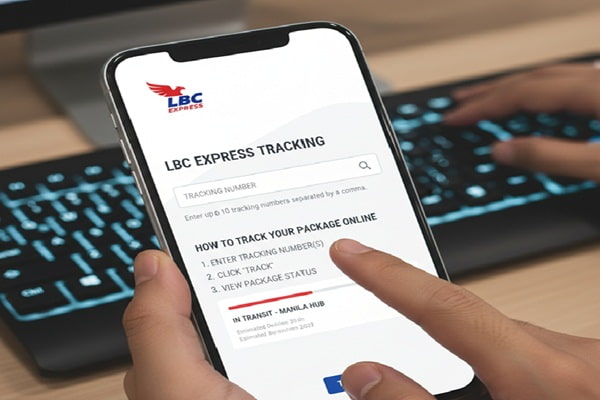
Method 1: Official LBC Website
This is the most direct method and pulls live data straight from LBC’s own system.
- Go to com/track
- Type your tracking number into the search field
- Click the Track button
- Your shipment history, current location, and status appear on screen
Your tracking number is on the lower left side of your LBC receipt, just below the barcode. It is also in your shipping confirmation email or SMS if the sender provided one.
Method 2: LBC Connect Mobile App
LBC Connect is LBC’s official mobile app, available free on iOS and Android. It offers the same tracking data as the website but adds push notifications and a branch locator so you can find your nearest LBC outlet instantly.
To track through the app:
- Download LBC Connect from the App Store or Google Play
- Open the app and tap the Track option on the home screen
- Enter your tracking number
- View real-time status updates and delivery history
The app also lets you set up SMS alerts so you get notified the moment your package status changes, which saves you from manually checking every few hours.
Method 3: Visit an LBC Branch
If you do not have internet access or prefer speaking to someone directly, walk into any LBC branch with your tracking number and a valid ID. The branch staff can pull up the exact same tracking information shown online. This is especially helpful when the online system shows an unclear status and you want a person to explain it.
Method 4: Third-Party Tracking Platforms
Several third-party platforms support LBC Express tracking and are useful when you want to track multiple parcels from different carriers in one place or when the official site is experiencing technical issues.
- 17TRACK (17track.net) supports bulk tracking of multiple LBC numbers at once
- AfterShip (aftership.com) is popular with online shoppers ordering from multiple stores
- TrackingMore (trackingmore.com) provides detailed scan history and transit timelines
- Parcels App (parcelsapp.com) available on iOS and Android with push notifications
- Ship24 (ship24.com) is particularly useful for Balikbayan box tracking alongside other carriers
Method 5: Facebook Messenger
LBC Express is active on Facebook and accepts tracking queries through Messenger. Message @lbcexpress with your name and tracking number and their support team will respond with your shipment status. This channel works especially well for quick status checks during business hours.
LBC Express Tracking Number: Formats and Where to Find Yours
This is one of the most commonly misunderstood parts of LBC tracking. Using the wrong number is the number one reason tracking returns no results.
Domestic tracking numbers (shipments within the Philippines): 12 to 17 digits, all numeric. Example: 174135660671
International tracking numbers: May be alphanumeric or a shorter 5-digit reference code depending on the service and origin country. If you have a 5-digit code and it returns no results, check your receipt or email for a longer secondary reference number.
Balikbayan box tracking numbers: Usually a 12-digit numeric code printed on your receipt near the barcode. If you booked through a partner agent or drop-off point, the sticker on your box also has the number.
Where exactly to find it:
- On the LBC receipt: lower left side, below the barcode
- In your shipping confirmation email or SMS from LBC or the sender
- On the physical label or sticker attached to your package or box
- Inside your LBC Online account under shipping history
- By contacting LBC customer support with your sender’s details
One important note: if you ordered from an online marketplace like Shopee or Lazada, your order number on the platform is not the same as your LBC tracking number. Look for a separate field labeled “Tracking Number,” “Waybill Number,” or “LBC Reference” in your order details.
LBC Express Tracking Status Meanings: Plain English
When you open your tracking page, you will see one of these statuses. Here is exactly what each one means in plain language.
| Status | What It Actually Means |
| Shipment Booked / Label Created | LBC has a record of your shipment but has not physically received it yet |
| Picked Up | LBC has collected the package from the sender |
| Received at Origin Hub | Your package is at the LBC sorting facility near the sender |
| In Transit | Package is moving between LBC hubs or facilities |
| Arrived at Destination Hub | Package has reached the LBC facility closest to the delivery address |
| Out for Delivery | A delivery rider or driver has your package and is heading to your address today |
| Delivery Attempted / Undelivered | LBC tried to deliver but was unsuccessful, usually because no one was home |
| Available for Pickup / Ready at Branch | Package is at an LBC branch waiting for you to collect it |
| Delivered | Package has been handed to someone at the delivery address |
| On Hold | Delivery is paused, often due to address issues, COD payment problems, or customer request |
| Returned to Sender | Package could not be delivered and is being sent back to the shipper |
| Awaiting Action | Package is queued and waiting for the next processing step |
If your status has not changed in more than 48 hours, that is when it makes sense to contact LBC directly.
LBC Express Tracking Not Updating: The Real Reasons
This is the most searched problem related to LBC tracking. Based on real customer reports from Trustpilot and shipping forums, here are the actual causes and what you should do about each one.
Reason 1: The Package Has Not Left the Sender Yet
When a seller generates an LBC label or books a pickup, the tracking system creates a record immediately. But if the package has not been physically picked up or dropped off at a branch yet, the tracking stays frozen at “Shipment Booked” or “Label Created.”
What to do: If you see this status for more than two business days, contact the seller or sender first. LBC cannot update tracking on a package they have not received.
Reason 2: Batch Processing at a Sorting Hub
LBC processes large volumes of packages at its hub facilities, particularly in Metro Manila. Scan updates do not happen in real time at every movement inside a hub. Packages sit in processing queues and scans are uploaded in batches, which means you can see a gap of 12 to 24 hours between scan events even when your package is actively moving.
What to do: If the last status is “Received at Origin Hub” or “In Transit” and it has been less than 24 hours, wait. This is normal. Check again the next morning.
Reason 3: High Volume Periods
Real customer complaints from December 2024 and January 2025 reveal that LBC tracking slows significantly during the Christmas holiday season, Holy Week, and peak eCommerce sale events like 11.11 and 12.12. During these periods, sorting hubs handle several times their normal volume and processing times stretch. A package that normally takes two days can take five.
What to do: During holiday periods, add two to three extra days to any expected delivery window before escalating to customer support.
Reason 4: Provincial and Remote Delivery Routes
Customers in provinces like Isabela, Batanes, and parts of Mindanao consistently report longer tracking gaps because packages travel through multiple sub-hub transfers and in some cases via sea ferry. Each transfer adds handling time and the tracking page may not update until the package arrives at the final delivery hub.
What to do: For provincial deliveries, especially outside of Luzon, give an extra one to three business days beyond the standard estimated delivery window before contacting support.
Reason 5: A Genuine Problem
If tracking has not updated in more than five business days and your package is past its expected delivery date, something may genuinely be wrong. Trustpilot reviews from verified customers include cases of packages stuck at sorting hubs for weeks without explanation and packages marked “out for delivery” multiple times without actually arriving.
What to do: Call LBC customer support directly. Do not rely only on email or Messenger for urgent issues. Have your tracking number, the sender’s name, and the destination address ready before you call.
LBC Express Delivery Times by Route
Knowing the expected window is the only way to judge whether your package is actually delayed.
Domestic Philippines:
| Route | Typical Delivery Time |
| Metro Manila to Metro Manila | Same day to next business day |
| Metro Manila to Luzon (provincial) | 1 to 2 business days |
| Metro Manila to Visayas | 2 to 3 business days |
| Metro Manila to Mindanao | 2 to 4 business days |
| Inter-provincial (non-Metro) | 2 to 5 business days |
International (from Philippines to abroad or from abroad to Philippines):
| Route | By Air | By Sea |
| USA to Philippines | 7 to 10 days | 55 to 90 days |
| Canada to Philippines | 7 to 14 days | 60 to 90 days |
| UK to Philippines | 10 to 14 days | 60 to 90 days |
| Middle East to Philippines | 5 to 10 days | 30 to 45 days |
| Singapore to Philippines | 3 to 5 days | 14 to 21 days |
| Australia to Philippines | 7 to 14 days | 30 to 60 days |
LBC does not deliver on Sundays or public holidays. Delivery hours are Monday to Saturday, 8 AM to 7 PM. These windows are not included when calculating business days.
How to Track a Balikbayan Box with LBC Express
Balikbayan boxes are one of LBC’s most iconic services and one of the most confusing to track, mainly because they travel by sea and the transit time is weeks, not days.
Every Balikbayan box is assigned a 12-digit tracking number printed on your receipt and on the sticker affixed to the box itself. Take a photo of this number before your box is collected. Once it leaves your hands, it becomes your only reference point.
What to expect after you drop off or have your Balikbayan box picked up:
- LBC consolidates boxes with other shipments going to the same destination
- Boxes move to a consolidation warehouse before being loaded into a sea container
- The container departs on a scheduled vessel; this step alone can take 1 to 3 weeks depending on shipment volume
- The container arrives at a Philippine port and goes through Bureau of Customs clearance
- LBC collects the box from the port and routes it to the regional hub nearest the recipient
- Last-mile delivery to the recipient’s home
Tracking updates during the sea cargo leg are infrequent. You may see nothing for two to three weeks while your box is in container transit. This is normal. The tracking page will show activity again once the container arrives at port and customs processing begins.
For Balikbayan boxes sent from the United States, delivery times by sea range from 50 days (from Hawaii to Metro Manila) to 135 days (from certain US states to remote Philippine provinces). Air cargo from the US takes an average of 7 to 10 days.
Use Ship24 or the official LBC tracking page for Balikbayan box updates. If your box has been in “In Transit” or “At Origin” status for more than six weeks and you have not received any update, contact LBC in your country of origin directly.
What to Do If LBC Says Delivered But You Have Not Received Your Package
This is one of the most frustrating scenarios and it happens more than it should. Here is the step-by-step process to handle it.
Step 1: Check around the property immediately. Look at building reception, the guardhouse, a neighbor, or any secondary access point. LBC riders sometimes leave packages with a nearby person if the recipient is unavailable and do not always leave a notification.
Step 2: Check your SMS and email. LBC sends notifications at key delivery stages. If the package required a signature, the SMS may include the name of who signed for it.
Step 3: Wait 24 hours. On rare occasions, the “Delivered” scan in the system happens before the physical delivery completes, especially when a rider pre-scans a batch at a hub.
Step 4: Contact LBC directly. Call (02) 8858-5999 (Metro Manila) or 1800-10-8585999 (provincial). Report the discrepancy with your tracking number, delivery address, and the date shown on the delivery scan. LBC can pull the rider’s delivery records and confirm where the package was left.
Step 5: File a formal claim. LBC accepts damage and loss claims in writing. For non-delivery or delivery error, the deadline is 90 days from the date of shipment. For damage or shortage, the deadline is 30 days from delivery. Prepare your tracking number, original receipt, and a description of the contents. Email your claim to customercare@lbcexpress.com.
Step 6: Escalate through the marketplace. If you bought through Shopee, Lazada, or another platform, open a return or dispute case in parallel. Most platforms have buyer protection policies and can process refunds faster than waiting for a carrier investigation to complete.
LBC Express vs Other Philippine Couriers: Tracking Comparison
| Feature | LBC Express | J&T Express | Ninja Van | PHLPost |
| Tracking frequency | Moderate, key scan points | High, frequent updates | High, frequent updates | Low |
| Mobile app | Yes (LBC Connect) | Yes | Yes | No |
| Balikbayan box | Yes (signature service) | No | No | No |
| International coverage | 30+ countries | Select Asian markets | Southeast Asia | 190+ countries |
| COD available | Yes | Yes | Yes | No |
| Branch network | 6,400+ locations | Large | Large | Post offices nationwide |
| Delivery days | Mon to Sat | Mon to Sat | Mon to Sat | Mon to Fri |
| Sunday delivery | No | Limited | Limited | No |
| Claim window (loss) | 90 days | Varies | Varies | 30 days |
LBC has the largest network and the strongest international presence, especially for OFW remittance and Balikbayan box services. On domestic tracking frequency and update speed, J&T Express and Ninja Van have an edge for eCommerce sellers who need higher real-time visibility.
How to Contact LBC Express Customer Support
| Channel | Contact Details |
| Metro Manila Hotline | (02) 8858-5999 |
| Provincial Hotline | 1800-10-8585999 |
| customercare@lbcexpress.com | |
| Facebook Messenger | @lbcexpress |
| Live chat | Available on lbcexpress.com during business hours |
| Branch visit | Over 1,400 LBC branches nationwide |
| International directory | lbcexpress.com/directory |
Support hours are generally Monday to Saturday during business hours. For international callers, use the global directory on the LBC website to find the number for your country.
When you contact support, have the following ready before the call or message:
- Your LBC tracking number
- The sender’s name and the recipient’s name
- The destination address
- The shipment date and service type
- Your LBC receipt if possible
Providing all of this upfront significantly reduces the time it takes for a support agent to locate and resolve your issue.
Mistakes to Avoid When Tracking LBC Packages
Using your marketplace order number instead of the LBC tracking number. These are two different numbers. Go back to your order details and look specifically for an LBC waybill or tracking number.
Expecting daily scan updates. LBC updates tracking at key processing points, not continuously. A gap of 24 to 48 hours between updates is completely normal during transit.
Contacting LBC about a package that has not been picked up yet. If tracking shows “Shipment Booked” but nothing else, LBC may not have the package yet. Contact the seller first.
Waiting too long to file a claim. The claim window for loss is 90 days from shipment date, not from when you notice the problem. Missing this window eliminates your right to compensation.
Not photographing your tracking number before dropping off a Balikbayan box. Once the box leaves your hands, the tracking number on your receipt is your only lifeline. If you lose it, recovering the number requires contacting the agent and providing detailed shipment information.
Checking tracking on a Sunday and expecting movement. LBC does not operate deliveries on Sundays or public holidays. Tracking will not update on these days.
Also Read : ECMS Tracking: How to Track Your Package in Real Time
Practical Tips for Smooth LBC Express Tracking
- Download the LBC Connect app and enable push notifications before your package ships. This removes the need to manually check tracking multiple times a day.
- Screenshot or save your tracking number in a notes app the moment you receive it. Do not rely on finding it in email later.
- For COD (Cash on Delivery) orders, make sure someone is home during delivery hours on weekdays. LBC riders will not leave COD packages unattended. If the first attempt fails, the package goes back to the branch and you need to coordinate redelivery.
- For high-value domestic shipments, ask the sender to request a signature on delivery. This gives you documented proof of receipt and strengthens any future claim if the package goes missing.
- If you are tracking a Balikbayan box and it has been more than three weeks without a tracking update, use Ship24 alongside the official LBC page. Ship24 sometimes picks up port arrival scan data faster than the official tracker refreshes.
- When checking tracking during peak holiday seasons, add at least two to three buffer days to the expected delivery date before assuming there is a problem.
Actionable Checklist: When Your LBC Tracking Is Not Working
Use this checklist before calling customer support. It resolves most tracking issues without needing to wait on hold.
- Confirm you are using the LBC tracking number, not your marketplace order number
- Check the lower left of your LBC receipt below the barcode for the correct number
- Try entering the number on 17TRACK or AfterShip as a cross-reference
- Check if more than 48 hours have passed since your last status update
- If status shows “Label Created,” contact the seller to confirm pickup has occurred
- If status shows “Out for Delivery” without arrival, wait one full business day
- If status shows “Delivered” without receiving the package, check with neighbors and building reception first
- If past the expected delivery window with no movement, call (02) 8858-5999 or message @lbcexpress on Messenger
- Document all contact attempts and responses if you need to file a formal claim
FAQ
How do I track my LBC Express package?
Go to lbcexpress.com/track and enter your 12 to 17 digit tracking number. You can also track through the LBC Connect mobile app, at any LBC branch, or on third-party platforms like 17TRACK and AfterShip.
Where do I find my LBC tracking number?
Your LBC tracking number is on the lower left side of your LBC receipt, just below the barcode. It is also in your shipping confirmation SMS or email. For marketplace orders, look for a field labeled “Tracking Number” or “Waybill Number” in your order details page.
Why is my LBC Express tracking not updating?
The most common reasons are batch processing delays at sorting hubs, high shipment volumes during peak periods, or the package not yet being picked up from the sender. Gaps of 24 to 48 hours between updates are normal. If there is no update after five business days past your expected delivery date, call (02) 8858-5999.
What does “Out for Delivery” mean on LBC tracking?
It means a delivery rider has your package on their vehicle and is attempting delivery at your address today. Delivery happens between 8 AM and 7 PM, Monday to Saturday. If it shows “Out for Delivery” but nothing arrives by 7 PM, call LBC the next business day.
How do I track a Balikbayan box with LBC?
Enter your 12-digit Balikbayan box tracking number at lbcexpress.com/track or Ship24. Sea cargo boxes take 50 to 90 days from the US and may show no updates for two to three weeks while in container transit. This is normal. The tracking page activates again once the container arrives at a Philippine port.
What should I do if LBC says my package was delivered but I have not received it?
Check with neighbors, building reception, or any household member first. Wait 24 hours in case of a system pre-scan. Then call (02) 8858-5999 with your tracking number. If unresolved, file a formal written claim to customercare@lbcexpress.com within 90 days of the shipment date.
Does LBC Express deliver on Sundays?
No. LBC Express delivers Monday to Saturday between 8 AM and 7 PM only. LBC does not deliver on Sundays or Philippine public holidays.
How long does LBC Express take to deliver domestically?
Metro Manila to Metro Manila is same day to next business day. Provincial deliveries within Luzon take 1 to 2 days. Visayas deliveries take 2 to 3 days. Mindanao deliveries take 2 to 4 business days.
How do I contact LBC Express customer service?
Call (02) 8858-5999 for Metro Manila or 1800-10-8585999 for provincial areas. Email customercare@lbcexpress.com. Message @lbcexpress on Facebook Messenger. For international support, find your country’s number at lbcexpress.com/directory.
Can I track multiple LBC packages at once?
Yes. Use 17TRACK at 17track.net, which allows bulk tracking of multiple numbers at once. AfterShip and Ship24 also support multi-parcel tracking for LBC Express.