
You placed a Flipkart order yesterday. Today the app shows “Packed.” Tomorrow it will probably say “Shipped.” After that, somewhere between the Ekart sorting hub in your city and your front door, the status might go quiet for a day. Then “Out for Delivery” appears, you wait all morning, and delivery happens at 6 PM.
Track Your Order
Or it does not happen at all, and you see “Delivery Attempted” at 3 PM when you were sitting at home.
Millions of Flipkart orders move through this exact system every single day. Most of them arrive on time, delivered by Ekart’s fleet of 7,000-plus trucks and 3,500 delivery hubs. But understanding what each status means, where to find your tracking number, which courier has your specific order, and what to do when something goes wrong is the difference between anxious guessing and informed waiting.
This guide explains all of it.
How Flipkart’s Tracking System Actually Works
Before diving into steps and status messages, it is worth understanding the architecture of Flipkart’s tracking system because it explains behaviour that confuses most buyers.
Flipkart does not operate as a single, unified logistics company. It operates as a marketplace with its own in-house logistics arm, Ekart, plus a network of third-party courier partners that cover areas Ekart does not yet reach.
More than 90 percent of Flipkart orders are delivered through Ekart Logistics, a subsidiary of Flipkart founded in 2009 and operated by Instakart Services Private Limited. Ekart runs a nationwide network that includes over 70 fulfilment centres, 80-plus sortation facilities, 7,000-plus trucks, and 3,500 delivery hubs serving over 15,000 pin codes. It handles approximately 9 million-plus shipments daily across the country.
For pin codes where Ekart does not operate, Flipkart assigns deliveries to third-party courier partners including Delhivery, BlueDart, Xpressbees, Ecom Express, DTDC, and India Post. Each of these partners has its own tracking system, its own tracking number format, and its own portal.
This multi-carrier architecture is why Flipkart’s tracking system is built into the Flipkart app and website rather than on a separate logistics portal. The Flipkart platform integrates with whichever carrier is handling your specific order and pulls status updates into one place so you do not need to know whether your parcel is with Ekart, Delhivery, or BlueDart to see the current status.
However, knowing which carrier has your order becomes important when you need to track on that carrier’s own portal, contact them directly, or understand why a particular status pattern is appearing.
Flipkart Order ID vs Tracking ID: The Most Important Distinction
This is the single most misunderstood aspect of Flipkart tracking and the primary reason customers enter numbers that return no results on tracking portals.
Your Flipkart Order ID and your Tracking ID are completely different identifiers that serve different purposes.
Flipkart Order ID Format: OD followed by 12 to 15 digits, for example OD123456789012345 Purpose: Identifies your purchase transaction on Flipkart’s platform Where to find it: Order confirmation email, SMS, My Orders section of the app Use it for: Accessing your order on Flipkart’s platform, contacting customer support, returns and refunds
Flipkart Tracking ID (Ekart tracking number) Format: 4 uppercase letters followed by 10 digits, totalling 14 characters, for example FMPC2947161205 Purpose: Tracks the physical shipment through the logistics network Where to find it: Becomes available after the order is shipped, in My Orders under the specific order, in the shipping SMS and email Use it for: Tracking on ekartlogistics.com, third-party tracking platforms, customer service queries about physical delivery
The Order ID cannot be used to track your shipment on the Ekart portal or on third-party platforms. It only works within Flipkart’s own system. If you try to enter your OD number on a courier tracking site, it will return no result.
If your order has been shipped but you have not yet received a Tracking ID, check the My Orders section in the Flipkart app rather than looking for it in emails. The tracking ID often appears in the app before the email notification is sent.
Ekart Tracking Number Format: Every Variant Explained
Ekart tracking numbers follow a consistent 14-character structure of four uppercase letters followed by 10 digits. The four-letter prefix varies and each variant corresponds to a different type of shipment or operational category.
FMPC (most common prefix) The most frequently seen Ekart tracking prefix, assigned to standard Flipkart consumer orders. Example: FMPC2947161205
FMPP (Flipkart Plus or priority shipments) Assigned to Flipkart Plus orders and certain priority delivery categories. Example: FMPP0123456789
FMPA (Flipkart Advantage or assured orders) Assigned to Flipkart Advantage orders fulfilled directly from Flipkart’s own warehouses. Example: FMPA1234567890
FMPB (B2B or bulk shipments via Ekart Surface) Assigned to Ekart Surface B2B deliveries for businesses, MSMEs, and bulk senders outside the Flipkart consumer context. Example: FMPB9876543210
All of these formats are trackable on the Ekart portal at ekartlogistics.com and on the Flipkart app and website.
How to Track a Flipkart Order: Every Method Available
Method 1: Flipkart App (Recommended)
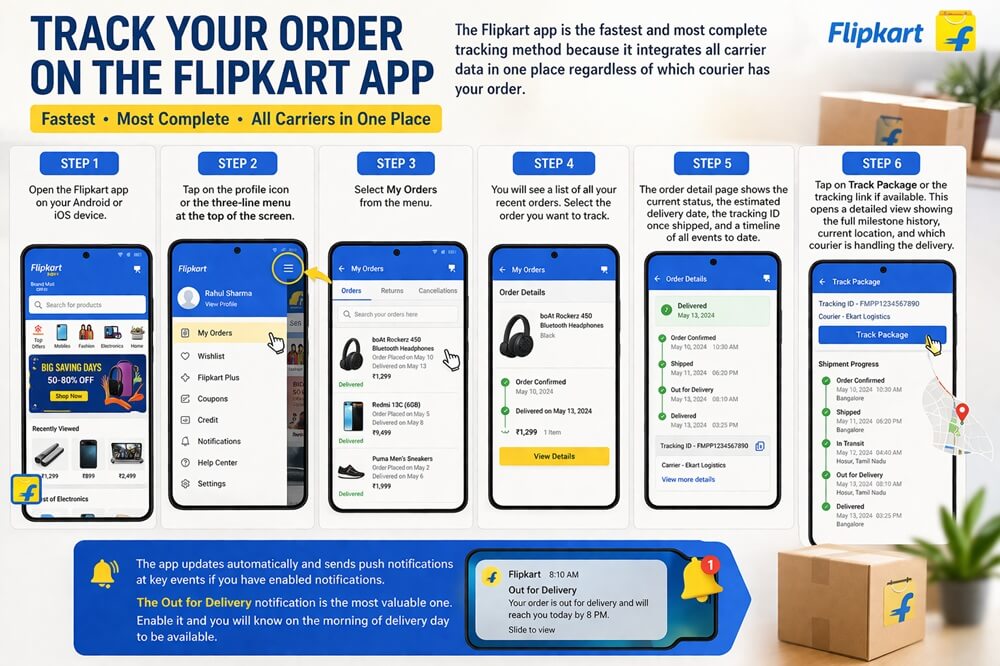
The Flipkart app is the fastest and most complete tracking method because it integrates all carrier data in one place regardless of which courier has your order.
Step 1: Open the Flipkart app on your Android or iOS device.
Step 2: Tap on the profile icon or the three-line menu at the top of the screen.
Step 3: Select My Orders from the menu.
Step 4: You will see a list of all your recent orders. Select the order you want to track.
Step 5: The order detail page shows the current status, the estimated delivery date, the tracking ID once shipped, and a timeline of all events to date.
Step 6: Tap on Track Package or the tracking link if available. This opens a detailed view showing the full milestone history, current location, and which courier is handling the delivery.
The app updates automatically and sends push notifications at key events if you have enabled notifications. The Out for Delivery notification is the most valuable one. Enable it and you will know on the morning of delivery day to be available.
Method 2: Flipkart Website
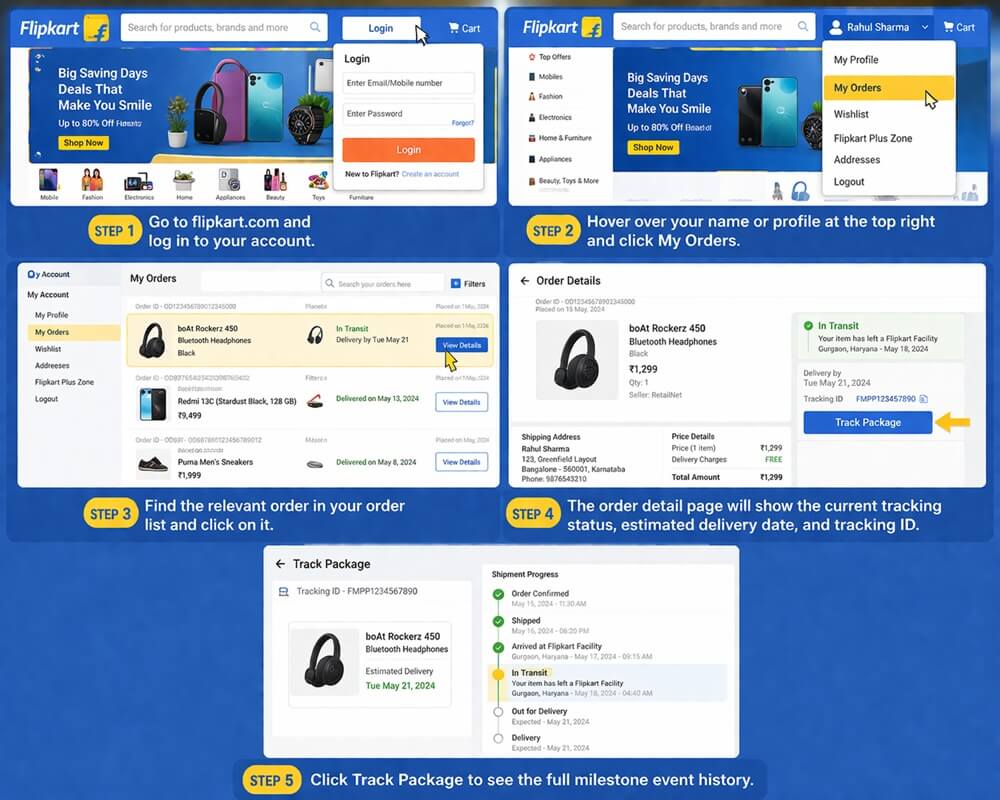
Step 1: Go to flipkart.com and log in to your account.
Step 2: Hover over your name or profile at the top right and click My Orders.
Step 3: Find the relevant order in your order list and click on it.
Step 4: The order detail page will show the current tracking status, estimated delivery date, and tracking ID.
Step 5: Click Track Package to see the full milestone event history.
Method 3: Track Without Logging In (Mobile Number)
Flipkart allows tracking through mobile number verification for customers who do not want to log in.
Step 1: Go to flipkart.com and click on My Orders.
Step 2: When prompted to log in, select the option to enter your mobile number and receive an OTP instead of using your password.
Step 3: Enter the registered mobile number and the OTP sent to it.
Step 4: You will see all orders associated with that number and can track directly.
Method 4: Ekart Direct Portal
For Ekart-handled orders specifically, the Ekart portal provides direct tracking independent of your Flipkart account.
Step 1: Go to ekartlogistics.com.
Step 2: Find the tracking section on the homepage.
Step 3: Enter your Ekart FMP tracking number, for example FMPC2947161205.
Step 4: The portal displays your current delivery status, last known location, milestone history, and delivery executive contact where available.
This method is useful when you want to contact Ekart directly rather than going through Flipkart customer support, particularly on delivery day when you need real-time information about your specific delivery.
Method 5: Third-Party Tracking Platforms
For customers who manage multiple orders across different platforms, third-party tracking tools aggregate Flipkart and Ekart data alongside other carriers.
17TRACK at 17track.net supports Flipkart and Ekart tracking with real-time updates. Suitable for international users or those managing multiple courier providers simultaneously.
AfterShip at aftership.com provides Ekart tracking with automated notification capability. Most useful for sellers rather than individual consumers.
TrackingMore at trackingmore.com supports Ekart tracking with API access for eCommerce businesses needing tracking integration.
Ship24 at ship24.com supports Flipkart order tracking by entering either the Ekart FMP number or tracking numbers from other Flipkart courier partners.
ParcelWILL supports Ekart tracking with branded tracking page capability for sellers.
Method 6: SMS and Email Tracking Updates
Flipkart sends automatic SMS and email notifications at key tracking events:
- Order confirmed
- Order packed
- Order shipped (includes tracking ID and estimated delivery date)
- Out for delivery
- Delivered
If you are not receiving these notifications, check whether your registered mobile number is current on your Flipkart account and whether SMS notifications are enabled in your account settings.
Flipkart Tracking Status Messages: What Every Update Means
Order Confirmed
Your payment has been processed and the seller has received your order. The seller is preparing to pack the item. This status typically lasts 1 to 2 business days for most sellers. For Flipkart Advantage orders, confirmation is faster because Flipkart handles the fulfilment directly from its own warehouse.
Packed
The seller has packed your order, attached the shipping label, and the parcel is awaiting courier pickup. This does not mean Ekart has collected it yet. It means the package is physically ready and a pickup has been scheduled. Many buyers mistake Packed for Shipped and wonder why the tracking is not showing movement. The parcel has not left the seller’s premises yet at this stage.
Shipped
Ekart or the assigned courier partner has physically collected the package from the seller. This is the first event in the physical logistics chain. Your Tracking ID appears at this stage and the estimated delivery date becomes more accurate. The milestone history will show the first scan event at the pickup location.
In Transit
Your package is moving through Ekart’s logistics network. It has been picked up from the seller and is progressing toward your delivery address through a sequence of sortation hubs, transit points, and delivery centres. Multiple scan events occur at each sorting facility as the parcel moves closer to your city.
In Transit can persist for 1 to 4 days on standard deliveries depending on the origin-destination distance. Do not expect continuous updates. Scan events happen when the parcel reaches a facility, not during road or air transit between facilities.
Out for Delivery
Your package has reached the local Ekart delivery hub in your area and a delivery executive has loaded it onto their vehicle. Delivery will be attempted today. The delivery executive may call your registered number when they are near your address to confirm availability.
In metro cities, Out for Delivery typically results in delivery within the same day. In tier-2 and tier-3 cities, the delivery window can extend until early evening.
Delivered
The package has been handed to you or an authorised person at your delivery address. Ekart records the delivery event with a timestamp. For certain order categories, a one-time password delivered to your registered mobile number is required at the time of handover to confirm receipt. The delivery executive enters this OTP in their device to complete the delivery event.
Delivery Attempted
Ekart tried to deliver your order but could not complete it. Common reasons include no one available at the address, inability to reach you by phone, access restrictions to your building or area, or unclear address details. Ekart will typically attempt delivery again on the next business day. You may receive a call or message asking you to confirm a convenient delivery time.
Act on this status immediately. Do not wait for the next attempt. Call the Ekart helpline or use the Flipkart app to confirm your address, update your availability window, or arrange for someone to receive on your behalf.
Return in Transit
Your cancelled order or return request package is on its way back to the seller’s facility. This status appears after you have initiated a return or cancellation. The reverse pickup process involves Ekart collecting from your address and transporting back through the same hub network. The refund process begins once the seller confirms receipt and inspection of the returned item.
Flipkart Advantage vs Seller-Fulfilled Orders: The Tracking Difference
This distinction is one of the most overlooked factors in Flipkart tracking quality and delivery reliability.
Flipkart Advantage Orders
Flipkart Advantage, sometimes shown as Flipkart Assured or F-Assured, indicates that Flipkart itself stores the product in its own warehouses and fulfils the order directly without seller involvement in the packaging and dispatch process.
For Advantage orders, the tracking journey begins at a Flipkart fulfilment centre rather than a third-party seller’s premises. This has several practical implications for tracking.
First, the Packed and Shipped stages happen faster because Flipkart’s own warehouse staff work under Flipkart’s operational SLAs rather than individual seller timelines. Second, tracking updates begin sooner and are generally more consistent because the package enters the Ekart network directly from a Flipkart facility. Third, the estimated delivery dates for Advantage orders tend to be more accurate and more often met because the entire supply chain from warehouse to doorstep is controlled by Flipkart.
Seller-Fulfilled Orders
Seller-fulfilled orders depend on individual sellers to pack and hand over their orders to Ekart or the assigned courier. The seller’s speed directly affects how quickly your tracking progresses from Order Confirmed to Shipped.
A seller with 24-hour dispatch capability will move your order from Confirmed to Shipped within one business day. A slower seller might take 2 to 3 days. During this period, your tracking will remain on Packed even though your order is progressing normally.
If your seller-fulfilled order shows Packed for more than 3 business days without moving to Shipped, use the Flipkart app to contact the seller directly through the order detail page. You can also contact Flipkart customer support to escalate if the seller does not respond.
Which Courier Has Your Flipkart Order?
When your Flipkart order is shipped, the My Orders tracking page will typically identify which courier partner is handling your delivery. Here is what you need to know about each.
Ekart Logistics
Handles over 90 percent of Flipkart orders. Your tracking ID will start with FMP. Track directly at ekartlogistics.com or through the Flipkart app. Ekart has Sunday delivery capability in most areas, which is a practical advantage for buyers who are not home on weekdays.
Delhivery
Handles significant Flipkart volume particularly in North and Central India. Tracking ID format is a 12 to 15 digit AWB number. Track at delhivery.com/tracking. Delhivery offers OTP-based delivery confirmation and has strong coverage in tier-2 and tier-3 cities. Provides detailed scan history at every checkpoint.
BlueDart
Used for premium products requiring faster and more secure delivery. BlueDart tracking numbers are 10-digit numeric strings. Track at bluedart.com. BlueDart offers the most granular domestic tracking scan frequency of any Flipkart courier partner and has particularly strong reliability in metro cities. Best tracking experience among all Flipkart’s courier partners.
Xpressbees
Growing logistics partner with expanding coverage in tier-2 and tier-3 cities. Tracking at xpressbees.com. Generally used for budget-friendly delivery segments.
India Post
Used for deliveries to extremely remote pin codes where private couriers do not operate regularly. Tracking at indiapost.gov.in. Tracking frequency is lower than private courier partners. Delivery timelines are longer. If your Flipkart order is assigned to India Post, add 2 to 5 extra days to the estimated delivery window.
Ecom Express
Third-party courier partner used in certain regions. Track at ecomexpress.in with the tracking number provided.
Common Flipkart Tracking Problems and Solutions
Status Stuck on “Packed” for More Than 3 Days
The seller has not yet dispatched the order. This is the most common reason for stalled tracking on seller-fulfilled orders.
Contact the seller through the Flipkart app by going to your order, selecting Need Help, and choosing the option to contact the seller. If no response within 24 hours, contact Flipkart customer support via the app or at 1800-208-9898.
Tracking Shows “Delivered” but Package Not Received
This is the most serious tracking problem and requires immediate action.
First, check with all household members, neighbours, building security, and the reception desk. Ekart delivery executives sometimes hand packages to a neighbour or security when the primary recipient is unavailable.
If the package is genuinely unaccounted for, open the Flipkart app and go to the order. Select I Have a Problem and then Item Not Delivered. Flipkart will initiate an investigation. For orders with OTP delivery confirmation, the delivery cannot be marked complete without your OTP, which provides strong protection against fake delivery marking.
File the complaint within 48 hours of the delivery being marked. After this window, the resolution process becomes significantly more difficult.
“Out for Delivery” Showing Since Yesterday with No Delivery
If this status persists for more than one full business day, contact Flipkart customer care at 1800-208-9898. They can contact the local Ekart delivery station to confirm your delivery is scheduled and obtain an approximate delivery window.
Also use the Flipkart app to verify that the address on the order is complete and correct, including the floor number, flat number, building name, and a working phone number. An incomplete address is the most common reason for delivery executives abandoning an attempt without calling.
Order Showing as Shipped but No Tracking Updates for Multiple Days
After the Shipped status appears, tracking can take 6 to 12 hours to show the first physical scan event as the package is picked up, transported to the first sorting hub, and processed. Gaps of 24 to 48 hours between updates are normal once the package is in transit between sorting facilities.
If there has been no update for more than 5 days after the Shipped status and the estimated delivery date has passed, contact Flipkart customer support to initiate a trace investigation.
Delivery Attempted but You Were Home
This happens and real customer complaints confirm it. If you were present at the address and received no call or knock while tracking shows a delivery attempt, contact Flipkart customer support immediately and report the specific time the attempt was logged. Request re-delivery for the following business day and ensure your phone is reachable on the registered number.
Big Billion Days and Festive Sales: What to Expect from Tracking
Flipkart’s annual Big Billion Days sale in October, along with other major sale events, generates order volumes that put significant pressure on the logistics network. During these periods, tracking behaviour changes in ways that are predictable if you understand the system.
Dispatch may be delayed by 1 to 3 business days compared to normal periods because sellers receive a surge in orders simultaneously. The Packed status may persist longer than usual while sellers process the backlog.
Ekart’s sortation hubs operate at maximum throughput during sale periods, which can slow individual scan event processing even when the physical packages are moving correctly. Tracking updates may appear less frequently than during normal periods.
Estimated delivery dates during sale events are typically more conservative to account for network load. Flipkart generally builds buffer time into sale-period ETAs, which means many orders actually arrive before the stated date.
The practical advice during sale periods is to check the My Orders page rather than expecting SMS notifications at every step, and to give the tracking an extra day before escalating a query to customer support.
Return Order Tracking: How It Works End to End
Flipkart’s return process has its own tracking lifecycle that is distinct from the standard delivery tracking.
When you initiate a return on Flipkart, the system schedules a reverse pickup from your address. This pickup is typically handled by Ekart regardless of which courier delivered the original order.
The return tracking journey includes these events:
Return Requested
You have submitted the return request through the Flipkart app. Flipkart has acknowledged it and is scheduling the pickup.
Pickup Scheduled
A reverse pickup has been assigned to an Ekart executive for a specific date. You will receive an SMS with the expected pickup date.
Picked Up
The Ekart executive has collected the return from your address. The return is now in the logistics network.
In Transit / Return in Transit
The returned item is moving back through Ekart’s network toward the seller’s location or a Flipkart returns processing facility.
Delivered to Seller / Received at Returns Centre
The item has arrived at the destination. The refund or replacement process begins after the seller or Flipkart inspects the returned item.
Refund Initiated
The return has been accepted and the refund has been triggered to your original payment method. Processing time is 3 to 7 business days for bank account refunds and 24 hours for Flipkart wallet credits.
Track your return order using the same My Orders section of the Flipkart app by selecting the relevant order and viewing the return status. The FMP tracking number assigned to the return pickup will appear once the pickup is completed.
Also Read : V-Trans Tracking: The Complete 2026 Guide for Every Shipment Type
Flipkart for Sellers: Understanding the Tracking Infrastructure
If you sell on Flipkart, your interaction with the tracking system is different from a buyer’s experience.
As a Flipkart seller, order management and shipping is handled through the Flipkart Seller Hub at seller.flipkart.com. When an order arrives in your seller dashboard, you have a specified dispatch window, typically 1 to 3 business days, to pack the order and hand it over to the assigned Ekart pickup executive.
Once the order is packed and ready, you generate the shipping label through the Seller Hub. The FMP tracking number is created at this stage and becomes visible to the buyer in their My Orders section once you update the order status to Ready for Dispatch and Ekart confirms pickup.
Tracking visibility for sellers includes:
- Pickup status confirmation
- Transit updates through the Ekart network
- Out for Delivery notification
- Delivery confirmation with OTP record where applicable
- Return pickup tracking for returned orders
For sellers using Flipkart Advantage, you ship inventory in bulk to Flipkart’s fulfilment centres and Flipkart handles the individual order fulfilment, tracking, and delivery from that point. This removes the dispatch responsibility from the seller but also reduces visibility into individual order status after inventory is handed to Flipkart.
Flipkart Quick Commerce Tracking
Flipkart Minutes is Flipkart’s quick commerce service offering delivery within 10 to 30 minutes for groceries, everyday essentials, and select products in supported areas.
Tracking for Flipkart Minutes orders works differently from standard order tracking. Instead of the multi-day milestone tracking of standard orders, Flipkart Minutes provides a live real-time delivery map similar to food delivery apps, showing the delivery executive’s position and a countdown to your delivery.
This live tracking experience is only available through the Flipkart app, not the website, and only for Flipkart Minutes orders in areas where the service operates.
Quick Reference Summary
Official tracking: Flipkart app, My Orders section
Order ID format: OD followed by 12 to 15 digits
Ekart tracking ID format: 4 uppercase letters plus 10 digits (FMPC, FMPP, FMPA, FMPB)
Example tracking number: FMPC2947161205
Ekart direct portal: ekartlogistics.com
Other courier portals: delhivery.com, bluedart.com, xpressbees.com, indiapost.gov.in
Flipkart customer care: 1800-208-9898 (toll-free)
Standard delivery timeline: 2 to 7 days
Flipkart Advantage delivery: Generally faster, Flipkart-controlled fulfilment
Sunday delivery: Available through Ekart in most areas
OTP delivery confirmation: Required for selected order categories
Return tracking: Available in My Orders under the specific order
FAQ
How do I track my Flipkart order?
Log in to the Flipkart app or website, go to My Orders, and select the order you want to track. The current status, estimated delivery date, and tracking ID are visible on the order detail page. Click Track Package for the full milestone history. No separate tracking site is needed for most orders. For Ekart-delivered orders, you can also track directly at ekartlogistics.com using the FMP tracking ID.
What is a Flipkart tracking ID and where do I find it?
The Flipkart tracking ID is a 14-character alphanumeric code beginning with FMP, such as FMPC2947161205, assigned when your order is shipped via Ekart. It appears in your My Orders section in the Flipkart app after the order is shipped, and is also included in the shipping SMS and email notification. It is different from your Order ID which begins with OD.
What does “Packed” mean on Flipkart tracking?
Packed means the seller has packaged your order and attached the shipping label but the courier has not yet collected it. The order is physically ready at the seller’s premises and a pickup is scheduled. The status will move to Shipped once Ekart or the assigned courier collects it. If Packed persists for more than 3 business days, contact the seller or Flipkart support.
What does “Out for Delivery” mean on Flipkart?
Out for Delivery means a delivery executive has your package on their vehicle and will attempt delivery to your address today. Be available at your registered phone number and delivery address. The executive may call to confirm your location. In metro cities, delivery usually happens within the business day. In other areas, it can extend until early evening.
Why does Flipkart tracking show “Delivered” but I did not receive my order?
Check with household members, neighbours, and building security first. If genuinely unreceived, open the Flipkart app, go to the order, select Need Help, and report Item Not Delivered. Flipkart will investigate. For orders with OTP delivery confirmation, the delivery cannot be marked complete without your phone OTP, which prevents fraudulent delivery marking. File your complaint within 48 hours.
How long does Flipkart take to deliver?
Standard Flipkart delivery takes 2 to 7 business days depending on your location, the seller’s dispatch speed, and whether the order is Flipkart Advantage. Metro cities typically receive delivery in 2 to 4 days. Tier-2 and tier-3 cities generally take 4 to 7 days. Remote pin codes served by India Post can take 7 to 14 days. During Big Billion Days and festive sales, add 1 to 3 buffer days to these estimates.
What is the difference between a Flipkart Order ID and a Tracking ID?
The Order ID starts with OD and identifies your purchase transaction on Flipkart’s platform. It is used for customer support, returns, and accessing your order on Flipkart. The Tracking ID starts with FMP and identifies the physical shipment in the logistics network. It is used to track the parcel on ekartlogistics.com and third-party platforms. The Order ID cannot be used to track your shipment on external courier portals.
Can I track a Flipkart order without logging in?
Yes. On the Flipkart website, go to My Orders, enter your registered mobile number, and authenticate with an OTP sent to that number. This displays all orders associated with the number. Alternatively, you can track directly on ekartlogistics.com using only the FMP tracking ID without any login required.
Which couriers does Flipkart use and which is best?
Flipkart uses Ekart for over 90 percent of orders, with BlueDart, Delhivery, Xpressbees, Ecom Express, DTDC, and India Post covering remaining areas. BlueDart provides the most granular tracking and fastest metro delivery. Ekart is the most consistent for standard Flipkart orders. Delhivery has strong coverage in North and Central India. India Post is the slowest with the least frequent tracking updates but serves the most remote locations.
How do I track a Flipkart return?
Go to My Orders in the Flipkart app and select the returned order. The return tracking status is visible on the same order detail page. After the Ekart executive collects the return from your address, a tracking number is assigned for the reverse journey and updates appear as the item moves back through the network. Refund is initiated once the returned item is received and inspected by the seller or Flipkart.
Conclusion
Flipkart tracking works well when you know how to read it. The architecture is not complicated once you understand that Ekart handles most deliveries with FMP tracking numbers, that third-party couriers handle the rest with their own number formats, and that the Flipkart app is the single best place to see all of it in one place regardless of which carrier has your package.
The most important practical habits are simple. Know that Packed means ready but not yet collected, and Shipped means the courier has it. Enable push notifications so Out for Delivery reaches you the same morning delivery is scheduled. Act immediately on any Delivery Attempted event rather than waiting for the next day. And if tracking shows Delivered but nothing arrived, file a complaint within 48 hours because that window matters for resolution.
For sellers, the key insight is that your dispatch speed directly shapes the buyer’s tracking experience. An order that moves from Confirmed to Shipped within 24 hours starts the tracking journey cleanly and sets the buyer’s expectations correctly. A 3-day Packed delay creates friction before Ekart has even touched the parcel.
Flipkart handles millions of orders daily across every category from furniture to groceries to electronics. The infrastructure behind those deliveries is one of the most scaled logistics operations in India. Knowing how it works means knowing what to expect, and that is the foundation of every smooth delivery experience.