
You placed an order. A shipment is on its way. Now you need to know where it is.
Track Your Order
If you are shipping or receiving freight through Dayton Freight Lines, you have one of the more reliable LTL carriers in the Midwest working on your behalf. But even with a carrier this dependable, knowing how to use the tracking system properly saves you time, stress, and unnecessary phone calls.
This guide covers every method for tracking a Dayton Freight shipment, what each status code actually means, what to do when tracking is not updating, and how to get a proof of delivery fast.
What Is Dayton Freight Lines?
Dayton Freight Lines is a privately owned, union-free less-than-truckload (LTL) carrier founded in 1981 by Thomas L. Cronin Jr. and headquartered in Dayton, Ohio. The company has grown into one of the most respected regional freight carriers in the United States.
Its core service area covers 14 states in the Central and Midwest region, including Ohio, Illinois, Indiana, Michigan, Wisconsin, Minnesota, Iowa, Missouri, Nebraska, Kansas, Kentucky, Tennessee, Pennsylvania, and Georgia. Through strategic partners, Dayton Freight also handles freight across all of North America.
| Key Fact | Detail | Why It Matters |
| Founded | 1981, Dayton Ohio | Established, experienced carrier |
| Service Centers | 70+ locations | Wide regional coverage |
| On-Time Rate | 98% reported | High delivery reliability |
| Claims-Free Rate | 99.6% reported | Low damage rate |
| Customer Support | 800.860.5102 | Direct phone access |
| Tracking Portal | tools.daytonfreight.com | Free, 24/7 access |
How to Track a Dayton Freight Shipment
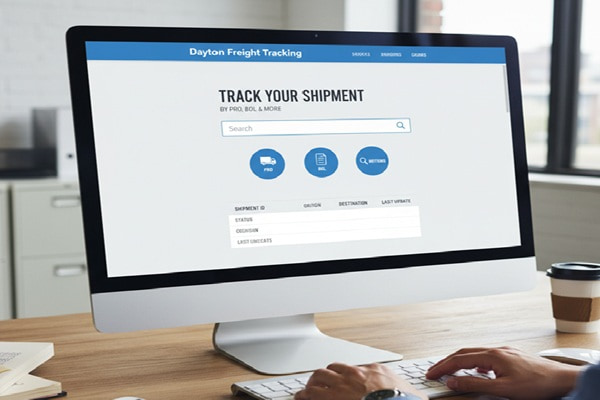
There are four main ways to track a shipment with Dayton Freight. Each method requires a different number that comes from your shipping documents or confirmation email.
Method 1: Track by PRO Number (Recommended)
The PRO number is the most accurate and fastest way to track your freight. It is a unique identifier assigned to each shipment at the time of pickup.
| What is a PRO Number? A PRO number (also called a progressive number) is an 11-digit code Dayton Freight assigns to every shipment. It usually begins with 004 and looks like this: 00467975143. You will find it on your bill of lading, invoice, or shipment confirmation email. |
Steps to track by PRO number:
- Go to tools.daytonfreight.com/Tracking/bynumber
- Enter your PRO number in the tracking field
- Click Track
- View live shipment status, location history, and estimated delivery time
You can also enter up to 25 PRO numbers at once for bulk tracking, which is useful for businesses managing multiple shipments.
Method 2: Track by BOL Number
If you do not have the PRO number, use the Bill of Lading (BOL) number. This is printed on your shipping documents at the time the shipment is created.
Steps to track by BOL:
- Visit the Dayton Freight tracking page
- Log in to your Dayton Freight account (required for BOL tracking)
- Select BOL Number as the identifier type
- Enter your BOL number and click Submit
Method 3: Track by PO Number
If you are a buyer or a retailer, your purchase order number can also be used to pull up shipment details. This requires logging into the Dayton Freight customer portal with your registered account.
Method 4: Track by Load Number
The load number is used mainly by shippers and logistics coordinators managing truckload shipments through Dayton Freight’s DFT Truckload service. You can enter this number in the same portal once logged in.
| Tracking Method | Account Required? |
| PRO Number | No – open to anyone |
| BOL Number | Yes – login required |
| PO Number | Yes – login required |
| Load Number | Yes – login required |
| Bulk PRO (up to 25) | No – open to anyone |
Dayton Freight Tracking Status Codes Explained
When you pull up your shipment, you will see a status code that tells you exactly where your freight is in the delivery process. Here is what each one means.
| Status Code | What It Means | What to Do |
| Picked Up | Freight collected from the shipper and entered into the system | No action needed |
| In Transit | Shipment is moving between terminals or service centers | Monitor for updates |
| At Destination Terminal | Freight arrived at the final service center before delivery | Expect delivery soon |
| Out for Delivery | Your freight is on a truck and heading to you today | Be available to receive |
| Delivered | Freight successfully delivered to the consignee | Confirm receipt and inspect |
| Shipment Exception | Delay or issue affecting the normal delivery timeline | Contact Dayton Freight support |
| Attempted Delivery | Driver arrived but could not complete delivery | Arrange a redelivery time |
Tracking Not Updating? Here Is What to Check
It is common for tracking to go quiet for several hours, especially during overnight linehaul moves between service centers. The freight is still moving, but scans only happen at specific checkpoints.
Before calling customer support, run through these checks:
- Double-check that you entered the PRO number correctly. A single wrong digit will return no results.
- Allow 2 to 4 hours after pickup before expecting your first tracking update.
- Overnight moves between terminals may show no update for 8 to 12 hours. This is normal.
- If the shipment shows At Destination Terminal for more than 24 hours, call the local service center directly.
- During peak shipping periods or severe weather, scan intervals can stretch longer than usual.
If you have checked all of the above and tracking still seems stuck, contact Dayton Freight directly:
- Phone: 800.860.5102
- Email: customerservice@daytonfreight.com
- Online chat: available at daytonfreight.com
Dayton Freight Services You Can Track
Dayton Freight offers several service types beyond standard LTL. Each has its own tracking pathway and speed expectations.
Standard LTL (Less Than Truckload)
This is the core service. Freight that does not fill an entire trailer is combined with other shipments. Tracking updates happen at each service center scan. Transit times depend on distance within the Midwest network.
DFXpedited Service
Dayton Freight’s expedited option guarantees faster delivery windows for time-sensitive shipments. These shipments receive priority handling and can be tracked the same way as standard LTL, but updates arrive faster and more frequently.
Guaranteed Service
If your shipment must arrive on a specific date, Dayton Freight’s Guaranteed Service locks in that delivery commitment. Tracking reflects the guaranteed delivery date alongside real-time status.
DFT Truckload
For full truckload shipments, Dayton Freight partners with pre-certified carriers. Tracking is available through the customer portal using your load number. Dayton Freight applies the same service standards to these shipments as its own fleet.
Special Services
Dayton Freight also offers lift gate service, deck bar trailers for reduced cargo damage, residential delivery, and inside delivery. These special services are noted in your shipment details within the tracking portal.
Also Read : https://www.nrbi.co/category/tracking/ODFL Tracking: Complete Guide to Track Old Dominion Freight Shipments
How to Get Proof of Delivery
Once your shipment shows Delivered status, you can download the proof of delivery (POD) directly from the Dayton Freight customer portal.
Steps to access your POD:
- Log in to your account at daytonfreight.com
- Go to View Images in your account dashboard
- Search by PRO number or date
- Download the PDF proof of delivery document
PODs include the recipient’s signature, delivery date and time, and the name of the person who accepted the freight. If a shipment arrives damaged, note the damage on the delivery receipt before signing.
Tracking Dayton Freight on Mobile
Dayton Freight does not currently have a dedicated mobile app. However, the tracking portal at tools.daytonfreight.com is fully mobile-optimized. You can access it on any smartphone browser without installing anything.
On mobile, you can:
- Enter and track PRO numbers
- View shipment history and status updates
- Check transit times and service center locations
- Access your account and download PODs (when logged in)
| Tip: Bookmark tools.daytonfreight.com/Tracking/bynumber on your phone for instant one-tap access to the tracking portal. No app download needed. |
Common Tracking Mistakes to Avoid
Most tracking issues come down to a few avoidable errors. Here is what trips people up most often.
- Entering the reference number from the shipper instead of the Dayton Freight PRO number. These are different numbers. The PRO is assigned by Dayton Freight, not the shipper.
- Expecting instant updates after pickup. Allow a few hours before the first scan appears in the system.
- Using a third-party tracking site and not cross-checking with the official Dayton Freight portal. Third-party sites may lag by several hours.
- Tracking by BOL without logging in. BOL-based tracking requires a registered account.
- Not noting freight damage on the delivery receipt before signing. Once you sign without noting damage, filing a claim becomes significantly harder.
- Calling the national support line for issues specific to a local service center. For local delivery questions, ask for the service center nearest the delivery address.
Dayton Freight Coverage: Where Does It Operate?
Dayton Freight’s direct service area focuses on the Central United States. The 14 core states covered are Georgia, Illinois, Indiana, Iowa, Kansas, Kentucky, Michigan, Minnesota, Missouri, Nebraska, Ohio, Pennsylvania, Tennessee, and Wisconsin.
Beyond this core region, Dayton Freight uses strategic partnerships to extend coverage across the rest of North America, including Canada, Puerto Rico, and Guam. Tracking for partner-network shipments follows the same PRO number process, though scan frequency may differ slightly outside the direct service area.
| Region | Coverage Type |
| Core Midwest (14 states) | Direct Dayton Freight service |
| Rest of United States | Strategic partner network |
| Canada | Partner-assisted service |
| Puerto Rico | Partner-assisted service |
| Guam | Partner-assisted service |
Tracking Checklist: What You Need Before You Start
Before you sit down to track a shipment, have the following ready:
- Your Dayton Freight PRO number (11 digits, begins with 004)
- Or your BOL number and account login credentials
- The expected delivery date or transit estimate from your shipper
- The destination zip code (helpful if contacting support)
- Your Dayton Freight account number if you are a registered shipper
Frequently Asked Questions
How do I track a Dayton Freight shipment?
Go to tools.daytonfreight.com and enter your PRO number in the tracking field. You can also track by BOL, PO, or load number when logged in to your account. Results show real-time status, location updates, and estimated delivery.
What is a Dayton Freight PRO number?
A PRO number is a unique 11-digit shipment identifier assigned by Dayton Freight at the time of pickup. It typically begins with 004. You can find it on your bill of lading, invoice, or shipment confirmation email. It is the fastest and most reliable tracking identifier.
Where do I find my Dayton Freight tracking number?
Your PRO number is on your invoice, shipping receipt, or confirmation email from the shipper. If you did not receive one, contact your shipper directly and ask them for the Dayton Freight PRO number from the pickup receipt.
Can I track using a BOL number without an account?
No. BOL number tracking requires you to be logged into a registered Dayton Freight account. PRO number tracking does not require an account and is available to anyone at tools.daytonfreight.com.
Why is my Dayton Freight tracking not updating?
Tracking goes quiet during overnight linehaul moves between terminals. This is normal and can last 8 to 12 hours. Also check that you entered the PRO number correctly. If the shipment shows no movement for more than 24 hours, contact customer support at 800.860.5102.
How long does Dayton Freight take to deliver?
Transit times depend on origin, destination, and service type. Within the core Midwest service area, most LTL shipments arrive within 1 to 5 business days. Use the transit time tool at tools.daytonfreight.com/service/eligibility for a point-to-point estimate based on zip codes.
Can I track multiple Dayton Freight shipments at once?
Yes. The public PRO tracking portal accepts up to 25 PRO numbers in a single search. Enter each number on a separate line or separated by commas. This is useful for businesses managing several outbound or inbound shipments.
What does Out for Delivery mean with Dayton Freight?
Out for Delivery means your freight is physically on a truck and is scheduled for delivery that business day. You should receive your shipment before the end of the driver’s route. If you have a time-sensitive delivery window, call the local service center for an estimated time of arrival.
How do I get proof of delivery from Dayton Freight?
Log in to your account at daytonfreight.com, click View Images, search by PRO number, and download the PDF. PODs include the recipient signature, delivery date, and time. They are usually available within a few hours of the delivered scan.
Does Dayton Freight deliver to residential addresses?
Yes, Dayton Freight offers residential delivery as a special service. This typically requires a lift gate since residential locations do not have loading docks. Make sure your shipment is set up for residential delivery before pickup to avoid delays or additional charges at the time of delivery.
Final Thoughts
Dayton Freight tracking is built for speed and transparency. The PRO number is your best friend. Keep it handy from the moment a shipment is created, and you will always know exactly where your freight stands.
If tracking goes quiet, give it a few hours before calling. Overnight terminal moves are completely normal and account for most of the gaps people notice. When something does go wrong, the support team at 800.860.5102 is responsive and capable of tracking down answers quickly.
For businesses shipping regularly through the Midwest, setting up a registered account unlocks BOL tracking, POD downloads, invoice access, and email notification options. It is worth a few minutes of setup and saves a lot of back-and-forth down the road.